zellij 0.45.1 is a terminal workspace: panes, tabs, floating windows and a status bar that shows which key starts each action. The Windows build is a single 50513920-byte executable, shipped in a 17336505-byte zip.
It solves the problem of running four things at once in one console window. Without it you either open four console windows and lose track of which is which, or you learn a multiplexer whose keys you forget between sessions.
I measured the launch cost three times, read every path zellij setup --check reports, and walked through the screen that blocks a first run before any pane appears.
One 50513920-byte executable
The release is a plain zip with one file inside. No installer, no MSI, no runtime to add. Unzip it anywhere and run it from a console.
| Item | Value | Note |
|---|---|---|
| Release zip | 17336505 bytes | x86_64-pc-windows-msvc |
| zellij.exe | 50513920 bytes | Single file, no DLLs |
| Version output | 14 bytes | The string "zellij 0.45.1" |
| Help output | 2866 bytes | 54 lines |
It needs a real console, not a pipe
zellij draws with ANSI escapes and reads keys from the console input buffer. Started under a pipe it exits without drawing anything, which is why every measurement here ran inside a real conhost window.
The msvc build has no external dependencies
50 MB is the Rust runtime plus the plugins compiled into the binary. The release notes confirm the default plugins are builtin, so nothing is loaded from disk on a clean install.
Launch costs 298 ms
Three runs of zellij --version took 620, 298 and 231 milliseconds. The first run paid for reading the 50513920-byte image off disk, and the third was already warm.
| Run | Milliseconds |
|---|---|
| 1 | 620 |
| 2 | 298 |
| 3 | 231 |
| Median | 298 |
Cold start is 2.7 times the warm start
620 against 231 ms is the file cache doing its job. Once the image is in memory the process is ready in under a quarter second, which is fast enough that opening a new session costs less than switching windows.
The first session pays more than later ones
The wizard screen and the release notes panel are drawn by plugins, so the first launch loads and starts them. Later launches attach to an existing server process and skip that work entirely.
First run stops at a wizard
Nothing appears except a full-screen prompt titled "First Run Setup Wizard (Step 1/1)". It offers two choices: Default, or Unlock First for non-colliding single keys.
| Choice | Keys | Trade-off |
|---|---|---|
| Default | Ctrl p, Ctrl t | Modes reachable directly from the base mode |
| Unlock First | Ctrl g then p | No collision with other apps, two keys per action |
| Leader | Ctrl | Modifier for the mode keys above |
Enter takes the default
The wizard accepts a single Enter. It writes the choice into the config directory and never asks again, so the cost is one keypress per machine rather than per session.
Then a release notes panel appears
The second screen lists what changed in 0.45.1: nested sessions, Kitty graphics protocol, scroll by command, mobile web UI, new UI, per-client tab sizes, focus last pane and fullscreen floating panes. It is dismissed with Escape.
Sessions get generated names
zellij list-sessions printed three sessions after three test launches, each named from an adjective and an animal: unflappable-zebra, lucky-capsicum, undulating-megalodon.
| Command | Output |
|---|---|
| zellij list-sessions | 3 sessions with age, e.g. "Created 2m 31s ago" |
| zellij attach | Reattaches to a named session |
| zellij kill-session | Ends one session by name |
Names are for humans, not scripts
Because every session gets a random pair of words, a script cannot guess the name. Pass --session with your own value when automating, or the attach step needs a lookup through list-sessions first.
Sessions survive the window closing
Three sessions were still listed after their console windows had been terminated, each with an age counter. The server keeps running in the background, which is the point of a multiplexer and also why the list grows if you never kill anything.
Where the configuration lives
zellij setup --check prints every path it uses plus whether the config parses. On a clean Windows 10 install it reported four locations and a valid config file that did not exist yet.
| Path | Value reported |
|---|---|
| Version | 0.45.1 |
| Config dir | %APPDATA%\Zellij\config |
| Config file looked for | config.kdl |
| Cache dir | %LOCALAPPDATA%\Zellij\cache |
| Plugin dir | %APPDATA%\Zellij\data\plugins |
Config is KDL, not YAML
The file is config.kdl. KDL is a node-based format where every line is a node name followed by arguments and children in braces. There is no indentation significance, so a broken file is usually a missing brace rather than a tab.
Missing config is not an error
The check reported "Well defined" even though the file was absent, because the builtin defaults apply. That means the honest answer to "is my config being read" is the path in the second line, not the verdict in the fourth.
13 commands, 11 flags
The 54-line help output lists 13 subcommands and 11 options in 2866 bytes. Two of the subcommands are the ones worth knowing before anything else.
| Subcommand | Purpose |
|---|---|
| options | Change behaviour of the running instance |
| setup | Check config and print paths |
| sessions | list, attach, watch, kill, delete, kill-all, delete-all |
| action | Send an action to a specific session |
| run | Run a command in a new pane, prints the pane ID |
| web | Serve terminal sessions over HTTP |
run is the scripting hook
zellij run returns a pane identifier in the form terminal_<id>, which is the only way to address a pane from outside. Everything else in the CLI operates on whole sessions.
web is off by default
There is a web subcommand that serves sessions over HTTP. It is not started by default and the release notes mention a mobile web UI, so treat it as an opt-in that needs its own port decision.
The mode bar is the documentation
The bottom line always shows the current modifier and the modes it unlocks: LOCK, PANE, TAB, RESIZE, MOVE, SEARCH, SESSION. Each label is a keypress away, so the tool teaches itself without a manual.
| Mode | What it covers |
|---|---|
| PANE | Split, close, move focus |
| TAB | Create, rename, switch tabs |
| RESIZE | Grow or shrink the focused pane |
| MOVE | Reorder panes inside a tab |
| SEARCH | Scrollback search |
| SESSION | Detach, rename, list |
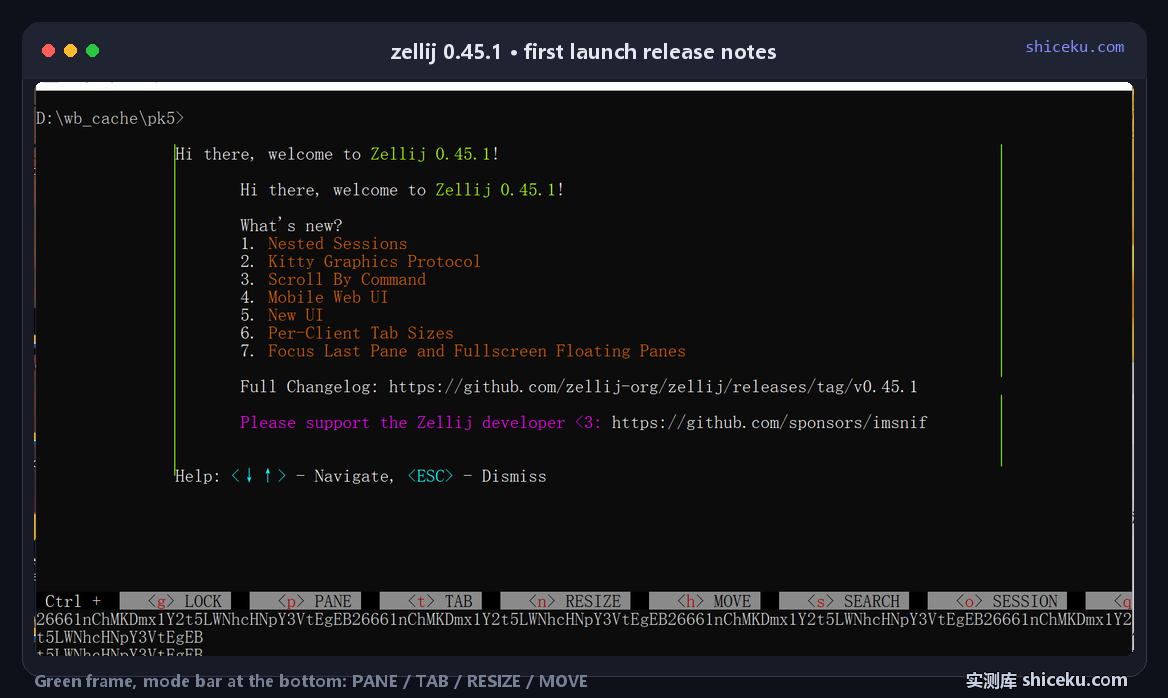
Nothing to memorise at the start
Because the bar states the modifier and the mode names, a new user only has to remember one key to begin. That is the opposite of a multiplexer whose prefix has to be memorised before the first split.
It costs one line of screen
The bar plus the tab line take two rows out of the console height. On a 32-line window that leaves 30 rows for panes, which is the trade you accept for not needing a cheat sheet.
Where it earns a place
Running a build, a log tail and a shell in one window, on a machine where you already have a console open all day.
| Task | Fit | Why |
|---|---|---|
| Split a console into panes | High | Mode bar removes the memorisation step |
| Keep work alive across window closes | High | Server outlives the console, sessions listed by age |
| Scripted pane control | Medium | Only run and action expose pane IDs |
| Windows Terminal replacement | Low | It runs inside a terminal, it is not one |
It is not a terminal emulator
zellij draws inside whatever console you start it from. Fonts, colours and scrollback limits all come from conhost or Windows Terminal, so it cannot fix a console that renders badly.
Licence and cost
MIT. Free for personal and commercial use, source on GitHub, written in Rust. The Windows zip is one file with no installer and no registry writes.