vegeta 12.13.0 is an HTTP load testing tool driven entirely from the command line: attack at a fixed rate for a fixed duration, save the results to a file, then analyse that file separately.
The problem it solves is repeatable measurement. A single run tells you what happened once; a saved result file lets you recompute the same numbers later, compare two builds, or plot the latency series without re-running the test.
I ran three fixed rates against a local single-threaded server serving a 130780-byte file, then read each result file back with report.
One 11425280-byte exe
Single file, no installer, no runtime. Written in Go, so the whole image is self-contained.
| Item | Value | Note |
|---|---|---|
| Release zip | 4463961 bytes | vegeta_12.13.0_windows_amd64.zip |
| vegeta.exe | 11425280 bytes | Standalone |
| Target | 130780 bytes | A local static file over http.server |
| Duration per run | 3 s | Fixed for all three rates |
Attack and report are separate commands
attack writes binary results to a file, report turns that file into numbers. This split is the whole design: the test does not decide which metrics matter, the analysis step does.
The rate is the input, not the concurrency
There is no connections flag in these runs. You state requests per second and a duration, and the tool works out how many virtual users it needs. That makes the load profile explicit rather than emergent.
Three rates, three result files
Each run asked for a constant rate for three seconds. The achieved rate matched the asked-for rate in all three.
| Requested | Completed | Achieved rate | Success |
|---|---|---|---|
| 50/s | 150 | 50.34 | 100.00% |
| 200/s | 600 | 200.41 | 100.00% |
| 500/s | 1500 | 500.17 | 100.00% |
150 requests in three seconds at 50/s
50 times 3 equals 150, and that is exactly what completed. There is no warm-up phase and no ramp, so the arithmetic is visible in the output.
All three runs succeeded
Success 100.00% at every level, including 500 per second. The server was a plain single-threaded http.server, so this is more a statement about a 130 KB static file than about the tool.
Latency went down as the rate went up
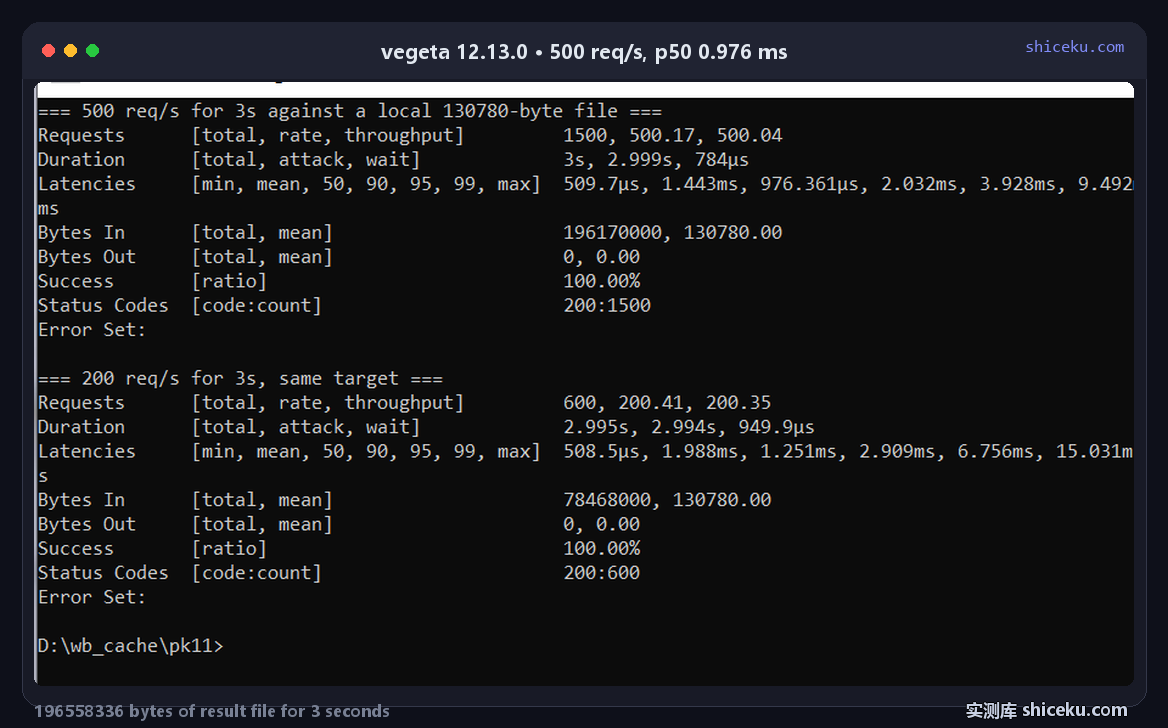
This is the result I did not expect. The 50/s run has a median of 2.88 ms; the 500/s run has a median of 0.976 ms.
| Rate | mean | p50 | p90 | p99 | max |
|---|---|---|---|---|---|
| 50/s | 4.805 ms | 2.88 ms | 4.76 ms | 81.361 ms | 82.896 ms |
| 200/s | 1.988 ms | 1.251 ms | 2.909 ms | 15.031 ms | 20.042 ms |
| 500/s | 1.443 ms | 0.976 ms | 2.032 ms | 9.492 ms | 15.049 ms |
The 50/s run has a 81 ms tail
At 50 per second each request arrives 20 ms apart, so the server is idle between them. A median of 2.88 ms with a 99th percentile of 81.361 ms means a handful of requests waited about 80 ms while the rest were fast.
The 500/s run spreads the work evenly
At 500 per second requests arrive every 2 ms and the server never idles. The spread between p50 and p99 shrinks to 8.5 ms, because there is no idle period for a request to land in the wrong state.
The result file reached 196 MB
By default vegeta stores the full response body with each result. Three seconds at 500 per second serving 130780 bytes is 196 MB of result file.
| Rate | Result file | Bytes In |
|---|---|---|
| 50/s | 19655780 | 19617000 |
| 200/s | 78623244 | 78468000 |
| 500/s | 196558336 | 196170000 |
Result file is slightly bigger than the payload
196558336 against 196170000 is a 388336-byte difference across 1500 requests, about 259 bytes of metadata per request. Everything else is the response body itself.
This is why long tests need a body limit
A ten-minute run at 500 per second against the same target would write roughly 39 GB. Against a real API returning 2 MB responses, three seconds would be over 3 GB. The body has to be discarded or truncated for anything longer than a smoke test.
What report gives you from the file
Every number above comes from reading a saved file, not from the run itself. The same file can be re-read with different options, or exported and plotted.
| Field | Meaning |
|---|---|
| Requests | total, achieved rate, throughput |
| Duration | total, attack, and wait after the last request |
| Latencies | min, mean, 50, 90, 95, 99, max |
| Bytes In / Out | total and mean per request |
| Success | ratio of non-error responses |
| Status Codes | count per HTTP status |
Duration separates attack from wait
The 200/s run reports 2.995 s total, 2.994 s attack and 949.9 µs wait. The wait is the time spent collecting the last in-flight responses after the timer stopped, which is a useful check that the run did not leave requests hanging.
Mean is misleading here
At 50/s the mean is 4.805 ms against a median of 2.88 ms. The gap is the 81 ms tail pulling the average up. Reading only the mean would suggest the 50/s run was slower per request than the 500/s run, which the percentiles contradict.
Targets come from a file, one definition per line
The whole test input for these runs was a single line: GET http://127.0.0.1:18090/doc_1000.md. Fifteen characters of method, one space, then the URL. Anything more complex — headers, a request body, a POST — is expressed by adding lines to that same file rather than by flags on the command.
One file can hold several endpoints
Because targets live in a file, a run can round-robin across several URLs by adding more lines. That keeps the load profile in version control next to the code, and means the exact request mix can be reproduced from the file alone.
Where it earns a place
Fixed-rate load against an endpoint you control, where you want the raw results kept so the same numbers can be recomputed later.
| Task | Fit | Why |
|---|---|---|
| Rate-limited load test | High | Rate is the input, achieved rate is reported |
| Comparing two builds | High | Saved files can be re-reported side by side |
| Long soak runs | Low | Result file grows with the response body |
| Ad-hoc "is it up" check | Low | Two commands, and a file to keep track of |
It does not pick the target for you
Targets come from a file, one line per request definition. There is no built-in scenario language, so multi-step flows such as login then fetch need to be expressed as separate target files or driven from outside.
Licence and cost
MIT. Free for personal and commercial use, source on GitHub, written in Go. The Windows build is one exe with no installer and no registry writes.