tealdeer 1.9.1 is a client for the tldr pages project, which replaces man pages with short examples. The Windows build is a single 3695104-byte tldr.exe.
The problem it solves is the first thirty seconds of using an unfamiliar command: you know it takes flags, you do not remember which, and the man page runs to nine screens before the first example.
I measured the cache download, the size of what lands on disk, and how long a single lookup takes compared with the process start-up cost.
One 3695104-byte exe
The Windows build is a single file with no installer. Everything it needs is linked in, and the page content lives outside it in a cache directory.
| Item | Value | Note |
|---|---|---|
| tldr.exe | 3695104 bytes | Standalone, no runtime |
| Version output | 15 bytes | One line naming 1.9.1 |
| --help output | 2158 bytes | Flags and config hints |
| Cache on disk | 4264961 bytes | 7395 files after --update |
The binary and the pages are separate
The exe is 3695104 bytes and contains no pages. The 4264961 bytes of content arrive separately on --update, which is why the first lookup fails on a clean machine.
No pages means an error, not an empty result
Running tldr tar before --update prints "Page cache not found" and exits. It does not fall back to anything, so a script that depends on it needs the update step first.
The cache is 7395 files
One --update wrote 7395 files totalling 4264961 bytes into %LOCALAPPDATA%\tealdeer. That is about 577 bytes per file, because each page is a short Markdown document.
| Metric | Value |
|---|---|
| Files written | 7395 |
| Total bytes | 4264961 |
| Average per file | 577 bytes |
| Location | %LOCALAPPDATA%\tealdeer |
7395 small files, not one blob
Because each page is its own file, a lookup only touches one of them. That also means the first query after an update pays no index-building cost: the filename is the command name.
The update is the only slow part
Downloading and unpacking 7395 files took long enough that the first attempt timed out at two minutes on this connection. After that, every lookup is local.
Lookups cost 141 to 143 ms
A single page lookup takes 141 to 143 milliseconds, and --version takes 140. The page itself costs almost nothing; the process start dominates.
| Command | Median | Output |
|---|---|---|
| tldr --version | 140 ms | 15 bytes |
| tldr tar | 143 ms | 1227 bytes |
| tldr rsync | 141 ms | 1693 bytes |
| tldr --list | 184 ms | 70195 bytes |
Three milliseconds to read a page
The gap between --version at 140 ms and tldr tar at 143 ms is the entire disk read and render for one page. Everything else is loading a 3695104-byte image.
Listing everything costs 44 ms more
--list walks the whole cache and prints 70195 bytes of page names in 184 ms. That is 44 ms above a single lookup, which sets the cost of touching all 7395 files at roughly 6 microseconds each.
Only 305 pages are for Windows
The cache splits into ten platform directories under pages.en, and the counts are lopsided: 4551 pages are common, 2070 are Linux, and only 305 are Windows.
| Platform directory | Pages |
|---|---|
| common | 4551 |
| linux | 2070 |
| osx | 375 |
| windows | 305 |
| dos | 26 |
| android | 22 |
| cisco-ios | 17 |
| sunos | 11 |
| openbsd | 10 |
| netbsd | 8 |
Windows is 4.1% of the cache
305 out of 7395 pages is 4.1%. Linux gets 2070, which is 6.8 times more. A command that exists on both platforms will usually resolve to the common or Linux page, and the examples will use POSIX flags.
The ten directories add up exactly
4551 plus 2070 plus 375 plus 305 plus 26 plus 22 plus 17 plus 11 plus 10 plus 8 equals 7395, the same file count the update reported. Nothing is stored outside these directories.
What a page looks like
The output starts with a one-line description, then a list of task-and-command pairs. Keywords inside the command are highlighted, and the flag letters are bracketed in the prose so you can see which letter does the work.
| Element | Example from the rsync page |
|---|---|
| Description line | One sentence on what the command is for |
| Task line | What you want to do, in plain words |
| Command block | --archive, --compress, --progress with paths |
| Bracketed letters | [c]reate maps the c in cf to create |
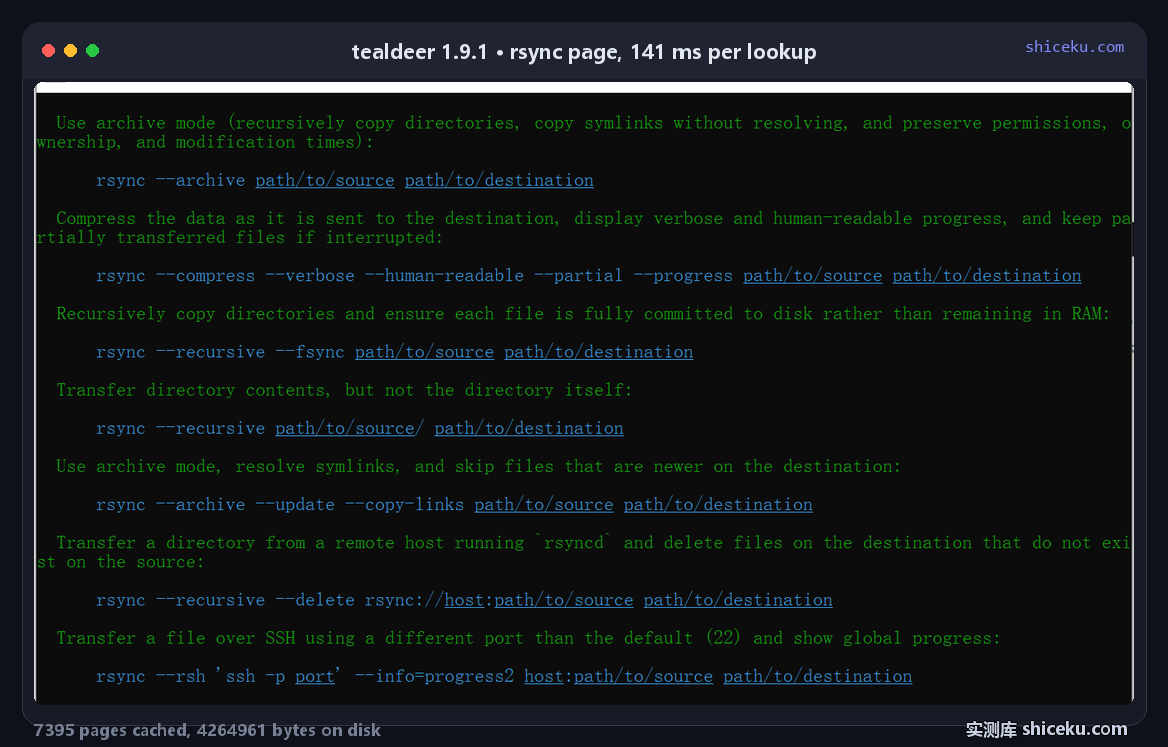
Brackets explain the short flags
On the tar page the line reads "[c]reate an archive and write it to a [f]ile", followed by tar cf target.tar file. The bracket tells you which letter in the command corresponds to which word.
No full option list on purpose
A page shows five to ten common invocations and stops. It is not a reference: if you need the complete flag list, the man page is still the place to look.
Flags worth knowing
The tool takes a command name and a few switches. Configuration lives in a file that it can generate for you.
| Flag | Effect |
|---|---|
| --update | Download and replace the whole cache |
| --list | Print every page name, 70195 bytes |
| --seed-config | Write a starter config file |
| --show-paths | Print where config and cache live |
> tldr --update
> tldr tar
  Archiving utility.
  Often combined with a compression method, such as `gzip` or `bzip2`.
Platform matters
Each page has variants per platform. The Windows build serves the common variant, so a command shown may assume POSIX paths or flags that do not exist in cmd. Check the page's platform list before copying.
Auto-update is opt-in
Without a config, the cache never refreshes and pages age. The starter config has an auto_update switch that has to be turned on explicitly.
Where it earns a place
Looking up a command you use twice a year, in a console where opening a browser costs more than the answer.
| Task | Fit | Why |
|---|---|---|
| Recalling flag combinations | High | 141 ms, examples first |
| Learning a new tool by example | High | Five to ten real invocations per page |
| Exact flag reference | Low | Pages omit the full option list |
| Offline on a fresh machine | Low | Needs one --update before anything works |
It complements man, not replaces it
A page answers "how do I do X with this command" in one screen. A man page answers "what does flag Y do" exhaustively. Both are one command away, and they are for different moments.
Licence and cost
MIT for the client, CC-BY-SA for the pages. Free for personal and commercial use, source on GitHub, written in Rust. The Windows build is one exe with no installer.