ripgrep is a search tool that walks a directory tree and prints matching lines with the file name and line number in front. It ships as one 4218880-byte executable, skips binary files by itself, and reads the ignore rules a repository already has.
What it replaces is the pair of commands people type on Windows when they need to find something: dir /s /b to list files, then findstr to look inside them. ripgrep does both passes in one process and stops on the first match in a file when you only need the name.
The numbers below come from one session on Windows 10 22H2, against a tree of 5000 files spread over 100 directories. The interesting part is not the peak speed. It is where the time actually goes on this platform.
One binary, no runtime
The release zip is 1789611 bytes and unpacks to 16 entries in 0.11 seconds. Besides the executable there are two licence files, a README, shell completions and a doc folder that holds the man page.
| File | Bytes | Role |
|---|---|---|
| rg.exe | 4218880 | The tool itself |
| Whole zip | 1789611 | 16 entries after unpacking |
| LICENSE-MIT | 1090 | Dual licence |
| UNLICENSE | 1219 | Public-domain option |
The version call costs 172 ms
Three runs of rg --version came back at 219, 170 and 172 milliseconds. The first run pays for Windows scanning a new executable, the following two are the real cost.
# 219 / 170 / 172 ms
rg --version
ripgrep 15.2.0 (rev e89fff89ac)
The build hash in brackets identifies the exact commit. If you need to prove a package was not tampered with, compare the sha256 of the zip as well.
5000 tiny files, 1.4 seconds
This is the number that surprised me. Listing the tree took 175 milliseconds, but searching the contents of the same tree took 1384. The files are six bytes each, so there is almost nothing to scan.
| Command | Result | Wall time |
|---|---|---|
| rg --files tree | 5001 entries | 308 / 175 / 176 ms |
| rg -l "x = 3" tree | 1100 files hit | 1544 / 1384 / 1384 ms |
| rg -c -w x tree | 5000 lines | 1311 / 1388 / 1392 ms |
| findstr /s /c:"x = 3" | same matches | 2012 / 1820 / 1954 ms |
Eight times slower than listing, for six bytes per file
Listing reads directory entries. Searching opens every file, reads it, closes it, then prints a path. On Windows the open-and-close pairs dominate, which is why 5001 files of six bytes cost more than a megabyte of one large file would.
That also explains why the 1100 hit files and the 5000 count lines land in the same range. The number of matches barely matters here; the number of files opened does.
Its own timer says seven milliseconds
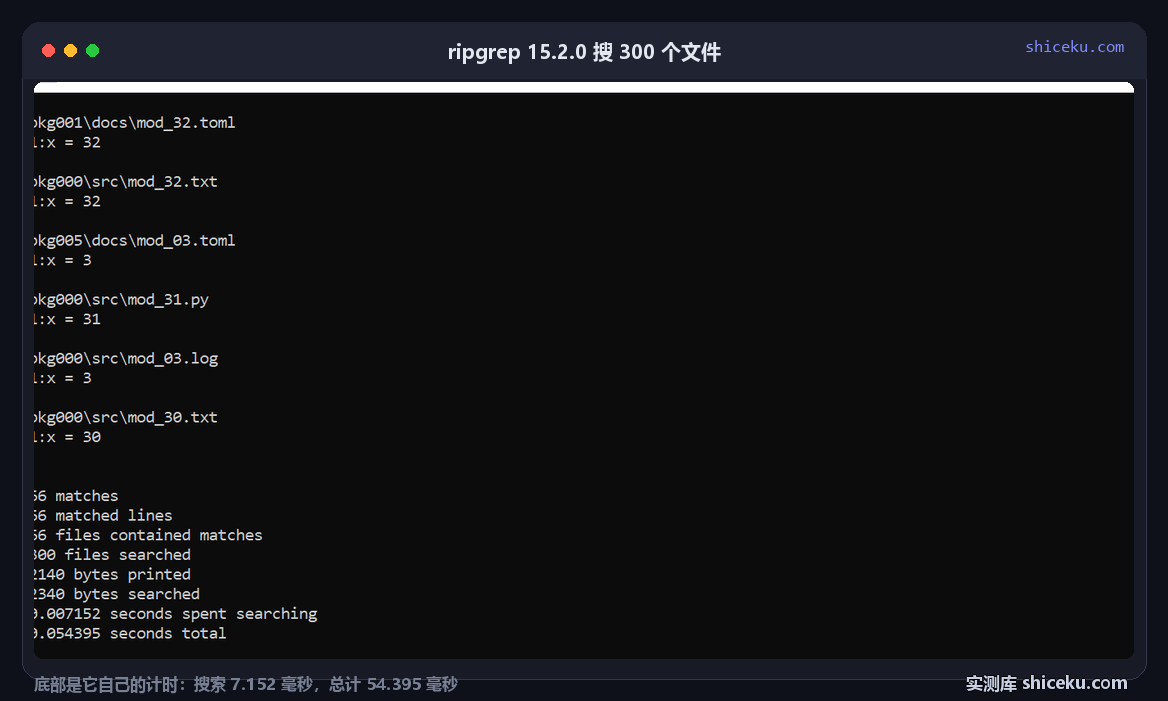
ripgrep reports what it measured internally when you pass --stats. On a 300-file subset it printed 0.007152 seconds spent searching and 0.054395 seconds total.
| Metric from --stats | Value |
|---|---|
| Matches | 66 |
| Files searched | 300 |
| Bytes searched | 2340 |
| Time spent searching | 0.007152 s |
| Total time | 0.054395 s |
The gap is process startup and console output
Seven milliseconds of real work inside a fifty-four millisecond wall clock means most of the time goes somewhere other than matching. On Windows that is loading the binary, initialising the regex engine, and writing coloured text to the console.
This matters when you script it. Looping over 200 directories and calling rg once per directory pays that overhead 200 times; one call with 200 paths pays it once.
# 200 calls, 200 startups
for d in */; do rg -l "TODO" "$d"; done

# one call, one startup
rg -l "TODO" .
Against findstr
The bundled alternative is slower on the same tree, but not by the margin usually claimed. 1954 milliseconds against 1384 is a factor of 1.4, not ten.
| Tool | Same tree, same pattern | Ratio |
|---|---|---|
| ripgrep | 1384 ms | 1.0 |
| findstr /s | 1954 ms | 1.4x slower |
| rg --files only | 175 ms | 7.9x faster, no content scan |
Where the difference really comes from
findstr prints every match on its own line and does no ignore handling. ripgrep filters as it walks, so on a repository with node_modules or a build folder the gap widens a lot. On a synthetic tree with nothing to skip, the two are close.
Report the tree, not just the ratio. A benchmark on 5000 tiny files says more about file-open cost than about regex speed.
What it ignores by default
Ignore rules are the feature people forget, and the one that causes "it works on my machine" reports. Hidden files are skipped, and inside a git repository the .gitignore file is honoured.
| Setup | Files found | Why |
|---|---|---|
| No .gitignore | 1100 | Baseline, every match counted |
| .gitignore with *.md, inside a git repo | 847 | 253 markdown files skipped |
| Same file, but .git directory moved away | 1100 | Rule ignored outside a repository |
| Same file in a repo, plus -u | 1100 | Ignore rules disabled |
The same file does nothing outside a repository
Drop a .gitignore into a folder that is not a git repository and the identical command still returns 1100 files. Move the .git directory back and the count drops to 847. That single difference explains most reports of missing results.
Use -u to back off the ignore rules, -H to include hidden files, and -g '!*.min.js' to exclude by glob.
Four things that bite
A path in the first position is a pattern
rg D:\projects does not search that folder. With one argument, ripgrep treats it as the pattern and searches the current directory, which usually returns nothing. Write rg PATTERN PATH.
cmd.exe does not expand globs
Passing *.md unquoted reaches the program as a literal string on cmd. Quote it as -g "*.md" and let ripgrep do the matching.
Binary files are skipped silently
A UTF-16 file, or anything with a NUL byte in the first block, is treated as binary and reported as a match on the file rather than on lines. Add --text if you know the file is text in another encoding.
Colour codes end up in redirected output
The same query in a pipe produced 545 bytes with no escape sequences; adding --color=always produced 875 bytes and every line carried them. Any downstream parser then sees control characters before the path.
When it pays off
Any time you are about to type dir followed by findstr. On a project tree with dependencies to skip, 1384 milliseconds against 1954 is the smaller part of the win; the real one is not writing two commands and a pipe.
It also earns its place in scripts because -l, -c and --files give you machine-readable output without parsing coloured text.
For a single large log file, or a one-off search in a folder of ten files, the built-in tools are fine. Most of ripgrep's advantage is in walking trees, not in matching bytes.
| Figure | Value |
|---|---|
| Executable | 4218880 bytes |
| Zip | 1789611 bytes |
| Content search, 5001 files | 1384 ms |
| findstr, same tree | 1954 ms |
| Internal search time (300 files) | 0.007152 s |