procs is a process viewer for the command line, shipped as a single 4200448-byte executable. It prints one row per process with CPU, memory, elapsed time and the command line, in colour.
The problem it solves is that Windows offers two bad options: Task Manager needs a desktop session, and tasklist prints 29486 bytes of text with no colour, no sorting and no column control.
I measured the launch cost, the output size against tasklist, and hit an environment quirk that made the tool print nothing at all until I worked around it.
A single 4200448-byte executable
The release zip is 1571894 bytes and holds one file. There is no runtime to install and no config file to seed.
| Item | Value | Note |
|---|---|---|
| Release zip | 1571894 bytes | procs-v0.14.12-x86_64-windows.zip |
| procs.exe | 4200448 bytes | Only file in the archive |
| Version command | 164 ms | Then 161 and 149 ms |
| Full listing | 455 ms | Three runs: 455 / 455 / 454 |
The version string carries the toolchain
# Three runs: 164 / 161 / 149 ms
procs --version
procs "0.14.12 ( rev: 8ad5da5, rustc: 1.96.0, build at: 2026/06/25 10:11:13 )"
Commit hash, compiler version and build timestamp are all in that one line. When a bug report depends on which binary someone runs, this settles it without opening the zip.
455 ms for a process list is slow
Enumerating every process and reading its command line costs more than printing the version. Three runs landed on 455, 455 and 454 ms, which is stable but an order of magnitude slower than the 149 ms launch.
223 rows against tasklist's 379
Both tools listed the same machine at the same moment. procs produced 223 rows and 11796 bytes; tasklist produced 379 rows and 29486 bytes.
| Tool | Rows | Bytes |
|---|---|---|
| procs | 223 | 11796 |
| tasklist | 379 | 29486 |
| Difference | 156 rows | 17690 bytes |
Fewer rows because of the column set
procs shows one line per process; tasklist prints a header block plus a separator and pads every column to a fixed width. The 17690-byte gap is mostly padding and repeated headers, not missing data.
Colour is the actual difference
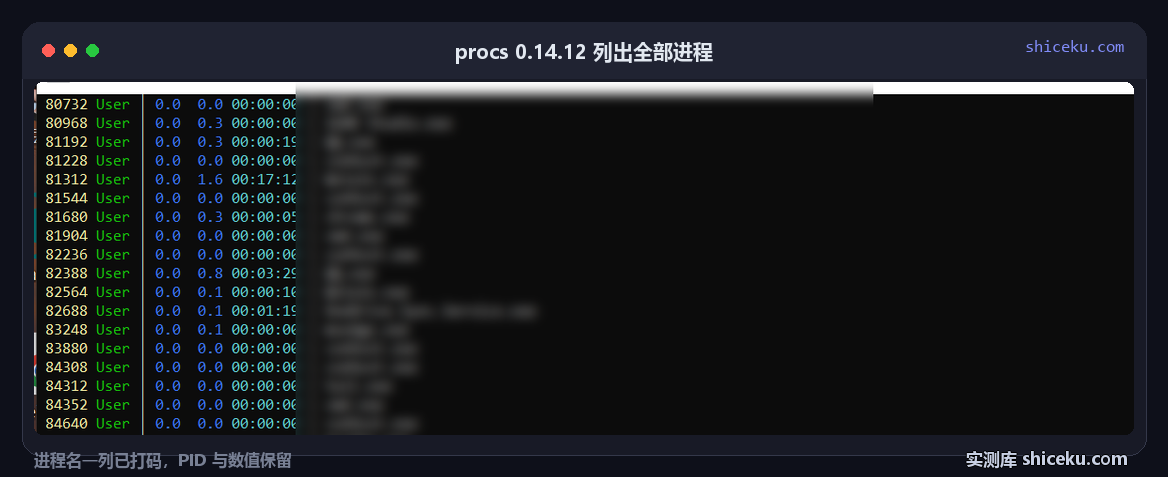
Six columns are colour-coded: PID, user, CPU percentage, memory percentage, CPU time and command. On a 140-column console the table reads at a glance, which is what a text dump cannot do.
It printed nothing on a console
The first screenshot attempt came back as a blank black window. The process ran, exited with status 0, and wrote nothing visible, while the same command captured through a pipe returned 11796 bytes.
| Invocation | Result |
|---|---|
| stdout inherited from console | 0 bytes visible |
| stdout captured through a pipe | 11796 bytes |
| captured, then written back to console | Table renders with colour |
Capture and re-emit is the workaround
Running procs with output captured, then writing those bytes to the console from the parent process, produced the expected table. Colour needed CLICOLOR_FORCE=1 in the environment, because the captured stream is not a terminal.
# Capture, force colour, then emit to the console
set CLICOLOR_FORCE=1
procs > out.txt
type out.txt
The second command loses the colour, since type writes plain bytes. The version that worked kept the escape sequences and wrote them to a console with virtual terminal processing enabled.
What the six columns actually show
The captured listing ran to 223 rows, and most of them read 0.0 in the CPU column with a CPU time of 00:00:00. That is not a bug: the percentage is an instantaneous sample taken once, so only processes doing work at that instant show a number.
| Column | Common value in the sample | Reading |
|---|---|---|
| PID | 80732 to 84932 | Sorted ascending by default |
| User | User | One account on a single-seat machine |
| CPU [%] | 0.0 for most rows | One snapshot, not an average |
| MEM [%] | 0.0 to 1.6 | Resident set as a share of total RAM |
| CPU Time | 00:00:00 or 00:17:12 | Cumulative since launch |
| Command | Truncated at 140 columns | Full path on wide consoles |
CPU time is the honest metric
A process showing 0.0 percent CPU but 00:17:12 of CPU time has consumed a quarter of an hour of processor time since it started. The percentage tells you what is busy now; the time column tells you what has been busy all day.
Sort before reading
Twenty-three rows fit on one screen but 223 do not. Sorting by CPU time, or filtering by name, is what turns the table into an answer. Reading an unsorted dump and guessing is how a slow process gets missed.
Before you install it
There is nothing to configure. What matters is the console, because the colour and the column layout both depend on it.
| Item | Observed here | Note |
|---|---|---|
| System | Windows 10 22H2 (19045.6466) | Official Windows build |
| Console | cmd.exe, 140 columns | Full table fits |
| Config written | None | Flags only |
| License | MIT | Commercial use allowed |
Narrow consoles cut columns
At 80 columns the command column is truncated, and the command is usually the part you wanted. Give it 140 columns or filter by name before printing.
Filtering is a positional argument
procs python keeps only rows whose command matches. That turns a 223-row dump into a handful, which is the only way the tool is usable on a busy machine.
Three things that cost time
An empty screen is not an empty process list
When the console shows nothing, check whether output was captured instead of displayed. 11796 bytes existed the whole time.
The colour flag is an environment variable
There is no --color option. CLICOLOR_FORCE=1 is the switch, and without it a captured stream stays plain.
Watch mode is opt-in
procs prints once and exits. Refreshing every second needs --watch, and leaving it on in a script means it never returns.
When it earns a place
On a remote shell with no Task Manager, this is the readable option. 223 rows in six columns, colour-coded, in 455 ms, beats reading 29486 bytes of tasklist output through a scrollback buffer.
If you only need one field, such as the PID of a process by name, tasklist and findstr are already there and cost nothing to install. The value shows up when you are reading the whole table, not extracting one cell.
| Item | Value |
|---|---|
| procs.exe | 4200448 bytes |
| Release zip | 1571894 bytes |
| Full listing | 455 ms, 223 rows |
| tasklist comparison | 379 rows, 29486 bytes |
| Output size | 11796 bytes |