oha 1.16.0 is an HTTP load generator written in Rust. The Windows build is a single 8453120-byte exe, and it reports throughput, a latency histogram and a per-error breakdown in one screen.
The problem it solves is finding out where an endpoint actually breaks, instead of guessing from a browser tab that feels slow.
I ran three concurrency levels against a local python -m http.server serving a 2011-byte page, and the interesting part is not the throughput: it is that oha tells you exactly which layer gave up.
One 8453120-byte exe
The Windows release is a single executable with no installer and no runtime to install.
| Item | Value | Note |
|---|---|---|
| oha.exe | 8453120 bytes | oha-windows-amd64.exe |
| Version output | One line | Prints oha 1.16.0 |
| Target | 2011-byte HTML | Served by python -m http.server on 18080 |
| Requests per run | 3000 or 2000 | Depends on concurrency level |
It drives itself, no external tooling
Point it at a URL with -n for request count and -c for concurrency, and it prints the whole report. No agent, no config file, no separate reporting step.
--no-tui for clean output
With a terminal it draws a live screen. Adding --no-tui prints the final report once, which is what the timings below used and what a script should capture.
Concurrency 10: everything succeeds
Three thousand requests at ten concurrent connections all returned 200. Average latency 5.9351 ms and 1486 requests per second.
| Metric | Value |
|---|---|
| Success rate | 100.00% |
| Total time | 2018.3157 ms |
| Average latency | 5.9351 ms |
| Fastest / slowest | 1.9241 ms / 512.1720 ms |
| Requests per second | 1486.3879 |
| Data transferred | 5.75 MiB at 2.85 MiB/s |
The slowest request took 512 ms
Average is 5.9 ms but the slowest is 512.1720 ms, 86 times the average. That gap is the first sign the server is not keeping up continuously, only most of the time.
1.96 KiB per request
Each response is 1.96 KiB while the page is 2011 bytes, so headers add a small constant to every request. Multiply by 1486 requests per second and the report shows 2.85 MiB/s.
Concurrency 50: success drops to 76.53%
Same 3000 requests at fifty concurrent connections. Throughput does not improve and a quarter of the requests fail.
| Metric | c=10 | c=50 |
|---|---|---|
| Success rate | 100.00% | 76.53% |
| Requests per second | 1486.3879 | 1485.5693 |
| Average latency | 5.9351 ms | 34.9 ms |
| 99th percentile | not reached in report | 1007.3 ms |
| Slowest | 512.1720 ms | 2011.6 ms |
Five times the concurrency, same throughput
1486 versus 1485 requests per second is a 0.06% difference. The server is saturated at around 1485 requests per second, so adding clients only adds waiting.
The 99th percentile jumps to one second
Median is 4.1 ms and the 95th is 12.3 ms, but the 99th is 1007.3 ms. One percent of requests wait about a second, which is the queue building up behind the single-threaded server.
Concurrency 200: 3.05% succeed
Two thousand requests at two hundred concurrent connections. Only 61 of them completed and the report names the reason directly.
| Metric | Value |
|---|---|
| Success rate | 3.05% |
| Total time | 1114.2244 ms |
| Average latency | 371.3476 ms |
| Fastest / slowest | 77.8468 ms / 466.6109 ms |
| Requests per second | 1794.9706 |
| Data transferred | 119.80 KiB |
os error 10048 is a client-side limit
The screenshot comes from a separate run of 2000 requests at concurrency 50, and its status block reads 324 responses with code 200 against 1676 failures of "os error 10048". On Windows that error means the local ephemeral port range is used up, so the failures sit on the load generator side rather than the server.
Every attempt still takes 371 ms
Average 371 ms with a fastest of 77 ms and a slowest of 466 ms is a narrow band, consistent with connection attempts waiting for a port and then giving up rather than the server slowly answering.
The histogram explains more than the average
The report draws a bar per latency bucket, then a percentile table, then a breakdown of where the time went.
| Section | What it shows |
|---|---|
| Histogram | One bar per bucket, so a long tail is visible as scattered short bars |
| Distribution | Percentiles from 10% to 99.99% in milliseconds |
| Details | DNS+dialup and DNS-lookup split, average and extremes |
| Status codes | Count per HTTP status, here 324 responses with 200 |
| Error distribution | Count per error string, here 1676 of os error 10048 |
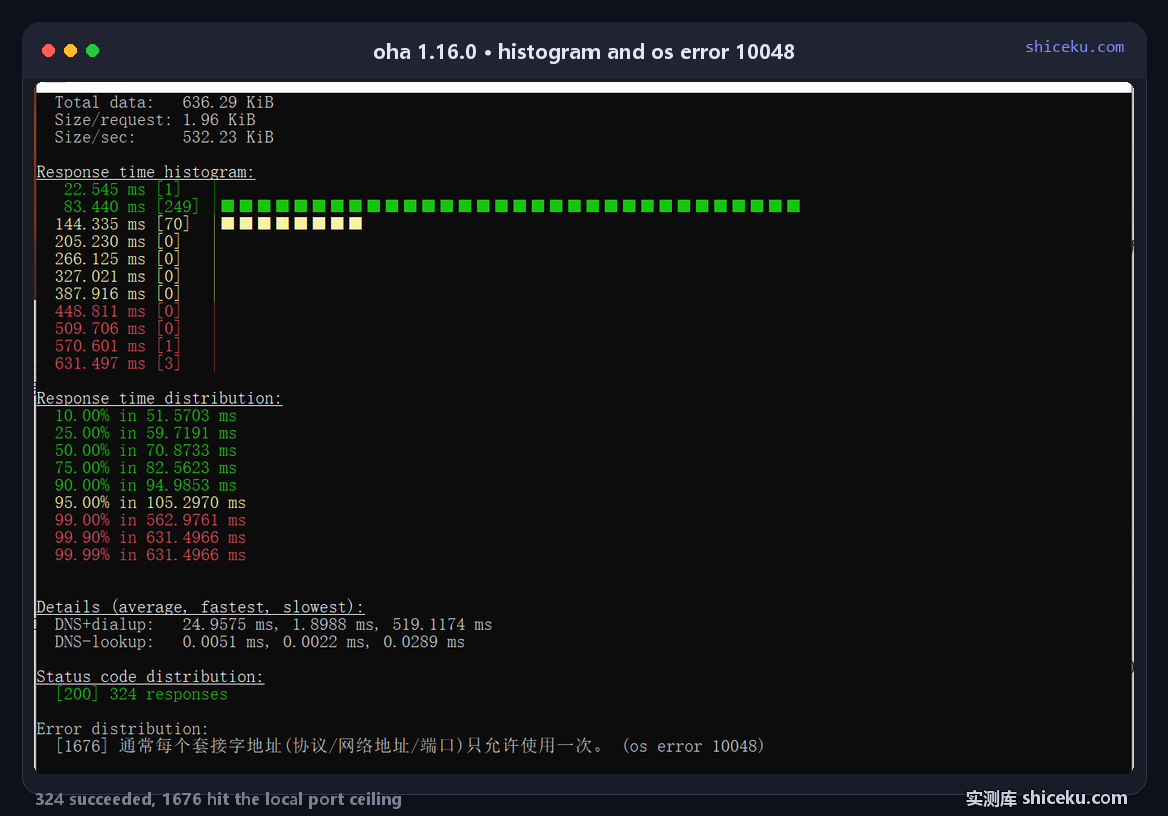
DNS-lookup is 0.0051 ms
Because the target is 127.0.0.1 there is nothing to resolve. The details block reports 0.0051 ms average for DNS-lookup against 24.9575 ms for DNS+dialup, which isolates how much of the connect time is name resolution.
Status codes and errors sit side by side
Seeing 324 successes next to 1676 port errors is what makes the diagnosis instant. A tool that only printed "3% success" would send you looking at the server first.
Three levels side by side
The same URL, three concurrency settings, three completely different stories. Throughput stays flat while success collapses.
| Concurrency | Requests/sec | Success | Average | Slowest |
|---|---|---|---|---|
| 10 | 1486.3879 | 100.00% | 5.9351 ms | 512.1720 ms |
| 50 | 1485.5693 | 76.53% | 34.9 ms | 2011.6 ms |
| 200 | 1794.9706 | 3.05% | 371.3476 ms | 466.6109 ms |
The 1794 figure counts attempts, not answers
At concurrency 200 the run finished 2000 attempts in 1114.2244 ms, which is 1794.9706 attempts per second. Only 3.05% of them got a response, so the number describes how fast the generator gave up rather than throughput the server delivered.
Slowest drops when everything fails fast
The 200-concurrency run shows a slowest of 466.6109 ms, lower than the 2011.6 ms at concurrency 50. When connections are refused immediately there is no long tail to wait for, so a "better" worst case is actually a worse result.
Where it earns a place
Before and after a change, on an endpoint you control, when you need to know the concurrency level at which it stops answering.
| Task | Fit | Why |
|---|---|---|
| Finding the breaking point | High | Three levels showed 100%, 76.53%, 3.05% |
| Comparing two builds | High | Same command, same numbers, one line diff |
| Long soak tests | Medium | Works, but watch local port exhaustion |
| Testing from one machine only | Low | os error 10048 appears around 200 connections |
Do not load-test from a single host
At 200 connections this run hit the Windows ephemeral port ceiling and 1676 of 2000 requests failed before reaching the server. Real load tests spread clients across machines for exactly this reason.
Licence and cost
MIT. Free for personal and commercial use, source on GitHub, written in Rust. The Windows build is one exe with no installer and no registry writes.