mdcat 2.7.1 renders Markdown in a terminal with colour, links and syntax blocks. The Windows build is a single 10794496-byte exe, and a 529780-byte document renders in 233 ms.
The problem it solves is reading a README over SSH, or checking a Markdown file before committing it, without a browser or an editor preview pane.
I rendered three documents of growing size and measured both the time and how much the output grows once terminal escape codes are added.
One 10794496-byte exe
Single file, no installer, no runtime. Written in Rust, so the whole image is self-contained.
| Item | Value | Note |
|---|---|---|
| Release zip | 4317178 bytes | mdcat-2.7.1-x86_64-pc-windows-msvc.zip |
| mdcat.exe | 10794496 bytes | Standalone |
| Version | 2.7.1 | Prints two copyright lines after the number |
| Input used here | 529780 bytes | The largest of three test documents |
Version output is three lines
mdcat --version prints the number, then a copyright line for Sebastian Wiesner and contributors, then a sentence about the licence. Anything parsing that output needs the first line only.
It takes a path, not stdin only
Pass a filename and it renders it. The output is plain stdout, so it pipes and redirects like any other text tool.
Three documents, 187 to 233 ms
Each test file was generated from headings plus bold text, inline code, a link and a three-item list, repeated N times.
| Headings | Markdown bytes | Time | Output bytes |
|---|---|---|---|
| 100 | 12880 | 223 ms | 18579 |
| 1000 | 130780 | 187 ms | 187779 |
| 4000 | 529780 | 233 ms | 757779 |
The 100-heading file was slower than the 1000
223 ms against 187 ms for a file eight times smaller. That is startup variance, not size: the process launch dominates at this scale, and the median of three runs still swings by about 40 ms.
527 KB costs 46 ms more than 13 KB
Going from 12880 to 529780 bytes added only 10 ms over the 100-heading run, and 46 ms over the 1000-heading run. Parsing is not the bottleneck at these sizes.
Output grows 43 percent
The largest file goes in at 529780 bytes and comes out at 757779 bytes. Every heading, bold run and code span gets wrapped in escape sequences.
| Document | In | Out | Growth |
|---|---|---|---|
| 100 headings | 12880 | 18579 | 44% |
| 1000 headings | 130780 | 187779 | 44% |
| 4000 headings | 529780 | 757779 | 43% |
The ratio is stable at 43 to 44 percent
All three documents grow by the same proportion, which means the overhead is per styled span rather than per file. A document with fewer inline styles would grow less.
Redirect to a file and the codes stay, unless you pass -c
Redirecting the largest file to a file still emits 64000 escape sequences and 757779 bytes. Adding -c drops it to 555565 bytes with zero escape sequences, which is only 25785 bytes above the input.
What it actually renders
The screenshot shows a five-line document going through it: heading, bold, inline code, a bulleted list, a fenced block and a link.
| Element | Result on screen |
|---|---|
| Heading | Cyan with an underline rule |
| Bold | Bold weight, no colour change |
| Inline code | Yellow background band |
| List items | Green bullet, indented body |
| Fenced block | Green text, no box |
| Link | Blue underlined text, URL hidden behind the label |
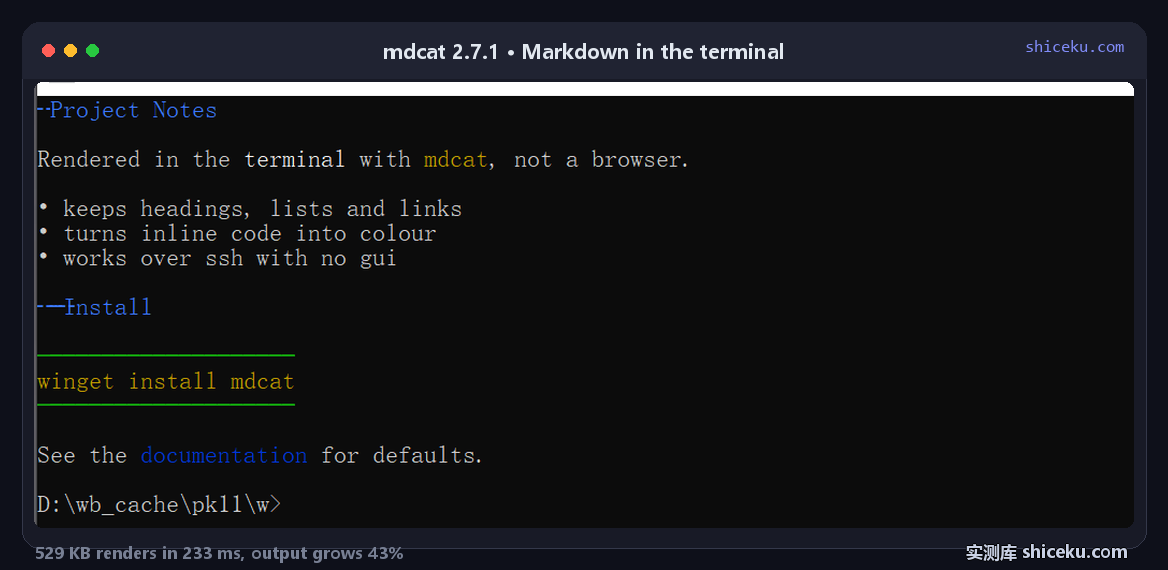
Links keep their label, not the URL
The rendered line reads See the documentation for defaults. with "documentation" in blue. The URL is not printed inline, which keeps prose readable but means you cannot see where a link goes without clicking.
Fenced blocks lose their fence
The ```powershell block renders as green text with no border and no language tag. It is readable, but a shell command and a JSON fragment look the same.
Nine flags in 1308 bytes
The full option list fits in 1308 bytes of help. None of them need a config file.
| Flag | Effect |
|---|---|
| -c, --no-colour | Strip all styles, output drops to 555565 bytes |
| --columns | Set the maximum output width |
| -l, --local | Do not fetch remote resources such as images |
| --fail | Exit on the first error instead of continuing |
| --detect-terminal | Print the detected terminal name and exit |
| --ansi | Skip detection, always emit ANSI |
| -p / -P | Paginate through a pager, or disable it (the default) |
| --completions | Emit shell completions for bash, zsh, fish, elvish or powershell |
| -V | Print the version |
--ansi and the default produce identical bytes
Both give 757779 bytes on the same file, because the terminal on this machine already causes colour to be enabled. The flag matters on the machine where detection guesses wrong.
It can be installed as mdless
The help ends by noting mdcat can be linked as mdless, which turns pagination on by default. Same binary, two behaviours, decided by the name it is invoked under.
--columns does nothing when redirected
Setting the width to 40, 80 or 120 produced byte-identical output on the same file, which is not what a width flag is supposed to do.
| --columns | Output bytes | Lines |
|---|---|---|
| 40 | 187779 | 7999 |
| 80 | 187779 | 7999 |
| 120 | 187779 | 7999 |
It only applies to a real terminal
All three runs went to a pipe rather than a tty. When stdout is not a terminal, mdcat skips the reflow entirely, so the flag is accepted and then ignored. If the width matters, the layout has to be checked on screen, not in a file.
The line count stays at 7999
7999 lines from 1000 headings, which is the source's own structure: heading, blank line, paragraph, blank line, three bullets. Wrapping would have changed this number if the flag had taken effect.
Where it earns a place
Reading documentation on a machine with no browser, or spot-checking a Markdown file's structure before it goes into a repo.
| Task | Fit | Why |
|---|---|---|
| Reading a README over SSH | High | Headings and lists become navigable structure |
| Checking headings before commit | High | 187 to 233 ms per file |
| Piping into another tool | Low | 43 percent of the bytes are escape codes |
| Rendering tables | Medium | Works, but narrow terminals wrap cells |
It is for reading, not for converting
There is no HTML or PDF output here. If the goal is producing a file, a converter is the right tool; mdcat exists to put styled text on a screen you are already looking at.
Licence and cost
MPL-2.0. Free for personal and commercial use, source on GitHub, written in Rust. The Windows build is one exe with no installer and no registry writes.