Helix is a modal text editor that runs inside a terminal. The Windows release unpacks to 1236 files and 215803023 bytes, with a 22347776-byte main executable at the root of the tree.
The problem it solves is editing a file on a machine you only reach through SSH. There is no window system there, so a GUI editor is out, and the choice is usually between an old vi clone and something built in this decade.
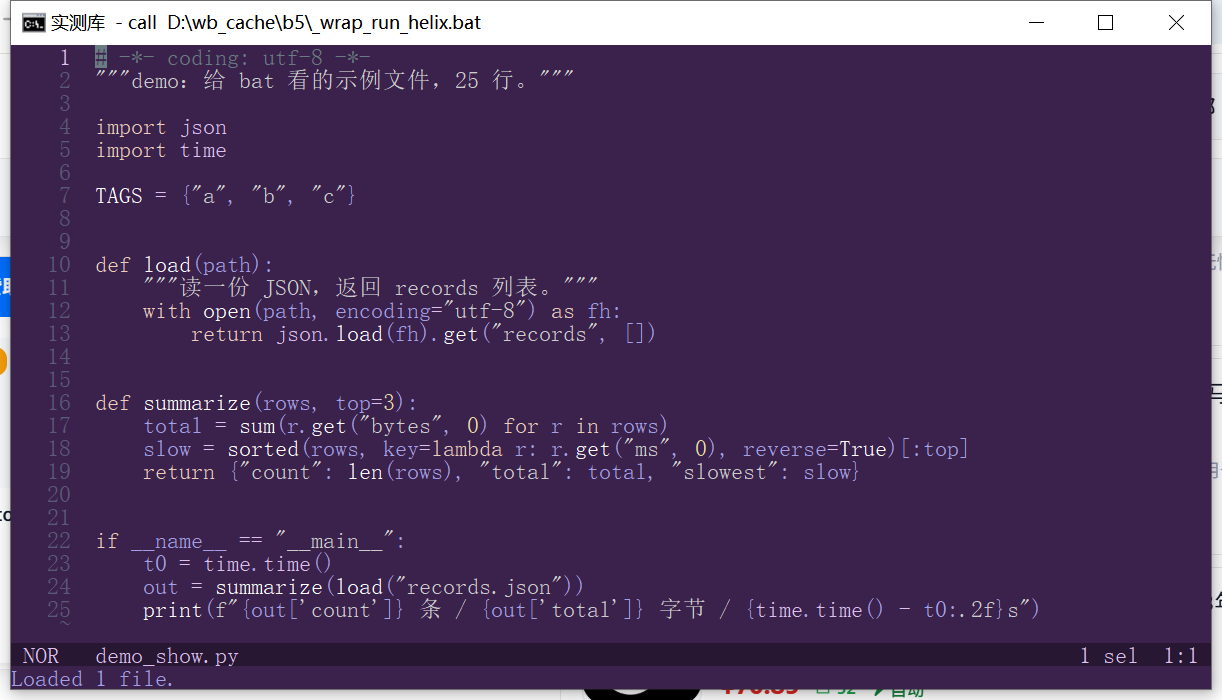
I unpacked the release, measured the version command and the time to first frame, then opened a 25-line Python file to check what the status line reports about the buffer.
1236 files for one editor
The download is 28550028 bytes and expands to 215803023 bytes, a 7.6x increase. That gap is the runtime: syntax queries, indent rules, themes and language definitions live next to the executable as separate files.
| Item | Value | Note |
|---|---|---|
| Release zip | 28550028 bytes | helix-25.07.1-x86_64-windows.zip |
| hx.exe | 22347776 bytes | At the root of the unpacked tree |
| Extracted size | 215803023 bytes | 1236 files |
| Version command | 327 ms | Then 118 and 121 ms |
The 7.6x expansion is the trade for no config
A single-file editor carries everything inside the executable; Helix does not. 1236 files means the runtime directory has to travel with the binary, and copying only hx.exe gives an editor that starts and then fails to highlight anything.
Version output
# Three runs: 327 / 118 / 121 ms
hx --version
helix 25.07.1 (a05c151b)
The first run took 327 ms because the whole tree was cold; the next two were 118 and 121 ms. Move the directory to a slow disk and that first number grows with the file count, not with the executable.
911 ms to first frame
Started inside a pseudo-terminal with a 130x34 window, the editor painted a usable screen 911 ms after launch. That figure includes the shell, the terminal setup and the first file load.
| Stage | Time | What is included |
|---|---|---|
| Process start | 121 ms | Version command, warm cache |
| First frame | 911 ms | Console, PTY, file load, initial paint |
| Output before first key | 28905 bytes | Escape sequences for the initial screen |
| Buffer opened | 25 lines | demo_show.py |
Almost a megabyte of terminal traffic on open
28905 bytes reach the terminal before any keystroke. A full redraw with truecolor styling is verbose; over a slow SSH link that volume is what you feel, not the editor's own CPU time.
What the status line reports
Bottom right showed 1 sel 1:1 with NOR at the left, and a message line said Loaded 1 file. That is the normal mode indicator, the selection count and the cursor position, all in 20 characters.
Modal editing without a plugin system
Keys work like vim in spirit: a normal mode for movement and commands, an insert mode for typing. The difference is that selections come before operators, so you select text and then act on it rather than composing verb-object pairs.
| Action | Keys | Result |
|---|---|---|
| Enter insert | i | Status changes from NOR to INS |
| Select line | x | Status shows 1 sel |
| Save | :w | Writes the buffer |
| Command palette | space | Fuzzy list of every command |
The space menu replaces memorising commands
Pressing space opens a searchable list of commands with their key bindings shown beside them. That is how you discover features without reading a 300-line cheat sheet.
No plugin ecosystem to install
Language support ships in the 1236 files, so a fresh install highlights Python, Rust, Go and the rest without downloading anything. The cost is that adding a language the release does not cover means rebuilding from source, which on Windows means a Rust toolchain. That path was not attempted here.
Before you unpack it
The editor writes nothing outside its own directory, so installation is a copy and removal is a delete. The thing to check is the terminal, because a console that cannot process escape sequences shows the screen as text.
| Item | Observed here | Note |
|---|---|---|
| System | Windows 10 22H2 (19045.6466) | Official x86_64 build |
| Console | cmd.exe, 130x34 cells | VT processing enabled |
| Config written | None on first run | Runtime dir only |
| License | MPL-2.0 | File-level copyleft |
Keep the whole directory together
hx.exe alone is 22347776 bytes but the other 1235 files are what make it an editor. Copy the directory, not the executable, and put the directory on PATH rather than the file.
Legacy consoles print the raw sequences
Without virtual terminal support the screen fills with cursor movement codes instead of a buffer. The same binary renders correctly once the console host enables VT, so the symptom points at the host, not the editor.
Three things that cost time
Missing runtime looks like a crash
Copy hx.exe somewhere else and it starts, then exits or opens an unstyled buffer. The runtime folder has to sit beside it; there is no error message that says so.
The first frame is not the startup cost
121 ms to print a version number and 911 ms to paint a screen are different measurements. Quoting the first as startup time understates what a user waits for by a factor of seven.
Selections persist between commands
After x the selection stays active, so the next operator applies to it. Coming from vim, where an action ends the visual range, this is the habit that breaks first.
When it earns a place
Editing files on a remote server is the case it was built for. 911 ms to a usable screen over a terminal, with syntax highlighting and no plugin install, beats assembling a vim configuration from scratch.
If you work on a desktop with a GUI editor open all day, a terminal editor is a second tool you will forget the keys for. The 215803023-byte runtime also means it is not something you drop into a small container image casually.
| Item | Value |
|---|---|
| hx.exe | 22347776 bytes |
| Extracted tree | 215803023 bytes / 1236 files |
| First frame | 911 ms |
| Initial terminal output | 28905 bytes |
| Buffer in test | 25 lines of Python |