gping 1.21.0 draws ping latency as a live chart inside the console. The Windows build is a single 3011072-byte exe inside a 1165727-byte zip.
Plain ping prints one line per packet and scrolls away. What you usually want to know is whether the latency is flat or spiky, and a scrolling text list is the wrong shape for that question.
I pinged two DNS hosts for a few minutes at the default one-second interval, read the statistics header for both, and checked what the chart looks like when one host is stable and the other has a spike.
One 3011072-byte exe
The release archive contains one executable and a man page. There is no installer and no DLL to keep beside it.
| Item | Value | Note |
|---|---|---|
| Release zip | 1165727 bytes | gping-Windows-msvc-x86_64.zip |
| gping.exe | 3011072 bytes | Standalone |
| Version output | 11 bytes | The string "gping 1.21.0" |
| --help output | 2484 bytes | Flags and usage |
| Man page | 3341 bytes | gping.1, shipped in the zip |
Rust binary, no runtime
3 MB is the Rust runtime plus the chart renderer. It starts instantly and needs nothing from the system beyond a console.
The man page ships with the Windows zip
A 3341-byte gping.1 is included even though Windows has no man reader. It is the same text as --help, just formatted for other systems.
Two hosts in one screen
Passing several hosts draws one chart per host, stacked. The screenshot has 223.5.5.5 on top and 119.29.29.29 below, each with its own statistics line.
| Host | last | min | max | avg | jitter | p95 | timeout |
|---|---|---|---|---|---|---|---|
| 223.5.5.5 | 26 ms | 25 ms | 28 ms | 26.116 ms | 288 µs | 27 ms | 0 |
| 119.29.29.29 | 24 ms | 24 ms | 31 ms | 24.266 ms | 440 µs | 26 ms | 0 |
Seven numbers per host, updated live
last, min, max, avg, jitter, p95 and timeout sit on one line above each chart. The two hosts differ by 1.85 ms on average and 152 µs on jitter, which is what two different paths out of the same machine look like.
Timeouts are counted, not hidden
The t/o column reads 0 for both. When a packet is lost the counter increments and the chart shows a gap, so a lossy link is obvious without grepping logs.
Jitter of 288 µs is the flat part
Jitter measures the spread between consecutive samples. 288 µs on a 26 ms average means the latency barely moves, and the chart reflects it: a straight band of green blocks with no vertical spikes.
| Metric | 223.5.5.5 | 119.29.29.29 |
|---|---|---|
| avg | 26.116 ms | 24.266 ms |
| min / max | 25 / 28 ms | 24 / 31 ms |
| jitter | 288 µs | 440 µs |
| p95 | 27 ms | 26 ms |
One host shows a spike, the other does not
In the screenshot the top chart has a vertical run of blocks at one point, meaning a single sample jumped to 28 ms while the rest stayed at 25 to 26. The bottom chart stays flat because its max only reached 31 ms on a wider spread.
Why the chart beats a text log
A 28 ms spike is one line in a ping log and easy to miss between 200 identical lines. On the chart it is the only thing taller than the band, which is the whole point of drawing it.
The chart covers 30 seconds
The time axis in the screenshot runs from 16:57:27 to 16:57:57 with a tick at 16:57:42 in the middle, so the visible window is 30 seconds of samples at the default one-second interval.
| Axis mark | Time |
|---|---|
| Left edge | 16:57:27 |
| Middle | 16:57:42 |
| Right edge | 16:57:57 |
A fixed window, not a growing one
Old samples fall off the left edge as new ones arrive on the right. That is why a spike stays visible for about 30 seconds and then disappears, which is long enough to notice and short enough to keep the scale readable.
Flags worth knowing
Two flags change the shape of the tool: one removes the chart entirely, one changes how often the chart redraws.
| Flag | Effect |
|---|---|
| --simple-graphics | No TUI, plain text output for piping |
| --watch-interval | Redraw interval in seconds |
| --interval | Does not exist; the parser suggests --watch-interval |
> gping --simple-graphics 223.5.5.5
223.5.5.5 (223.5.5.5)   last 26ms  min 26ms  max 26ms  avg 26ms  jtr 0ns  p95 0ns  t/o 0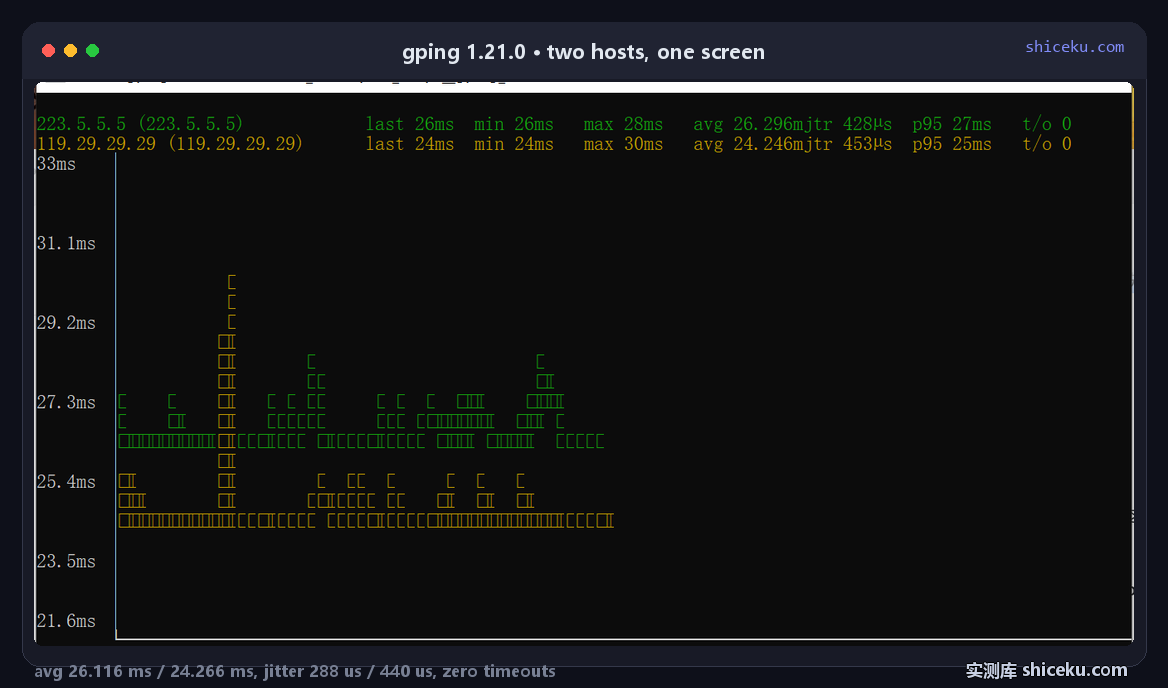
--interval is not a flag
Typing --interval returns "unexpected argument" plus a suggestion for --watch-interval. The error message names the correct flag, so the mistake costs one round trip rather than a document search.
Piping needs the simple mode
--simple-graphics drops the TUI and prints one statistics line per host. Without it, redirected output is full of box characters and colour escapes, which is exactly what you do not want in a log file.
The chart needs VT processing
gping draws with ANSI escapes and expects the console to interpret them. In a bare conhost without virtual terminal processing, the output shows literal escape sequences instead of a chart.
| Environment | Result |
|---|---|
| Windows Terminal | Chart draws correctly |
| conhost with VT enabled | Chart draws correctly |
| conhost without VT | Escape codes printed as text |
| Piped output | Unusable unless --simple-graphics |
Same problem as any Rust TUI
Tools that write ANSI directly rather than calling the Console API depend on the terminal to parse it. Windows 10 1909 and later support VT, but a console inherits the mode from whoever launched it, so an old launcher can leave it off.
Simple mode sidesteps it entirely
When the chart is not the point, --simple-graphics removes both the TUI and the VT requirement, at the cost of losing the visual spike detection.
Where it earns a place
Watching whether a link is stable, in a window you can leave open, without installing a desktop monitoring app.
| Task | Fit | Why |
|---|---|---|
| Checking link stability | High | Jitter and p95 on one line, spikes visible |
| Comparing two paths | High | Two charts stacked, same time axis |
| Logging latency over hours | Low | Screen-based, no export |
| Bandwidth testing | None | It only sends ICMP echo |
It is a viewer, not a recorder
Nothing is written to disk. If you need a history, run --simple-graphics and redirect the text, then plot it somewhere else.
Licence and cost
MIT. Free for personal and commercial use, source on GitHub, written in Rust. The Windows build is one exe with no installer and no registry writes.