gitui is a terminal user interface for git. The Windows build ships as a 4757777-byte archive holding one 9923584-byte executable, with no installer and no runtime to add.
The problem it solves is that a terminal git workflow has no overview. You run status, then diff, then log, and each command scrolls the last one away. gitui puts unstaged changes, staged changes and the selected diff on one screen.
I opened it against a repository with 29 commits and three branches, measured the time to first frame, and read what each pane reports back.
One 9923584-byte executable
The archive is a tar.gz rather than a zip, so Windows needs tar, 7-Zip, or the two-step extract most tools offer. Unpacking gives a single file.
| Item | Value | Note |
|---|---|---|
| Release archive | 4757777 bytes | gitui-win.tar.gz |
| gitui.exe | 9923584 bytes | The only file inside |
| First frame | 788 ms | Screen painted, key hints visible |
| Output before first key | 3163 bytes | Escape sequences for the initial layout |
788 ms to a usable screen
Launched inside a pseudo-terminal at 120 by 36 cells, the interface was readable 788 ms after start. That covers the shell, the repository scan and the first paint, so the editor itself is not the slow part.
3163 bytes of setup traffic
Before any keystroke, 3163 bytes of escape sequences reach the terminal: box drawing, colour SGR codes and cursor moves for five panes. Over a slow SSH link that traffic is what you notice, not the binary size.
Five tabs, three of them on one screen
The top row is Status, Log, Files, Stashing and Stashes, with a number in each. Status was active and counted 1, meaning one entry waiting.
| Tab | Shown | What it answers |
|---|---|---|
| Status [1] | Unstaged and staged changes | What is not committed yet |
| Log [2] | Commit list | What happened recently |
| Files [3] | Tracked file tree | Where a file lives |
| Stashing [4] | Stash actions | Park work in progress |
| Stashes [5] | Existing stashes | What was parked |
The three panes are the point
Left top lists Unstaged Changes, left bottom lists Staged Changes, right pane shows the diff of whatever is selected. On a 120-column terminal all three fit at once, which is what git status and git diff cannot do in sequence.
The number in brackets is a count
Log [2] and Files [3] carry counts while Status carries 1. Those numbers update as the working tree changes, so an empty list is visible without opening the tab.
What the diff pane shows
Selecting added.py filled the right pane with a hunk header and two added lines, both green. The file was untracked, so gitui rendered a diff against an empty blob rather than against a previous commit.
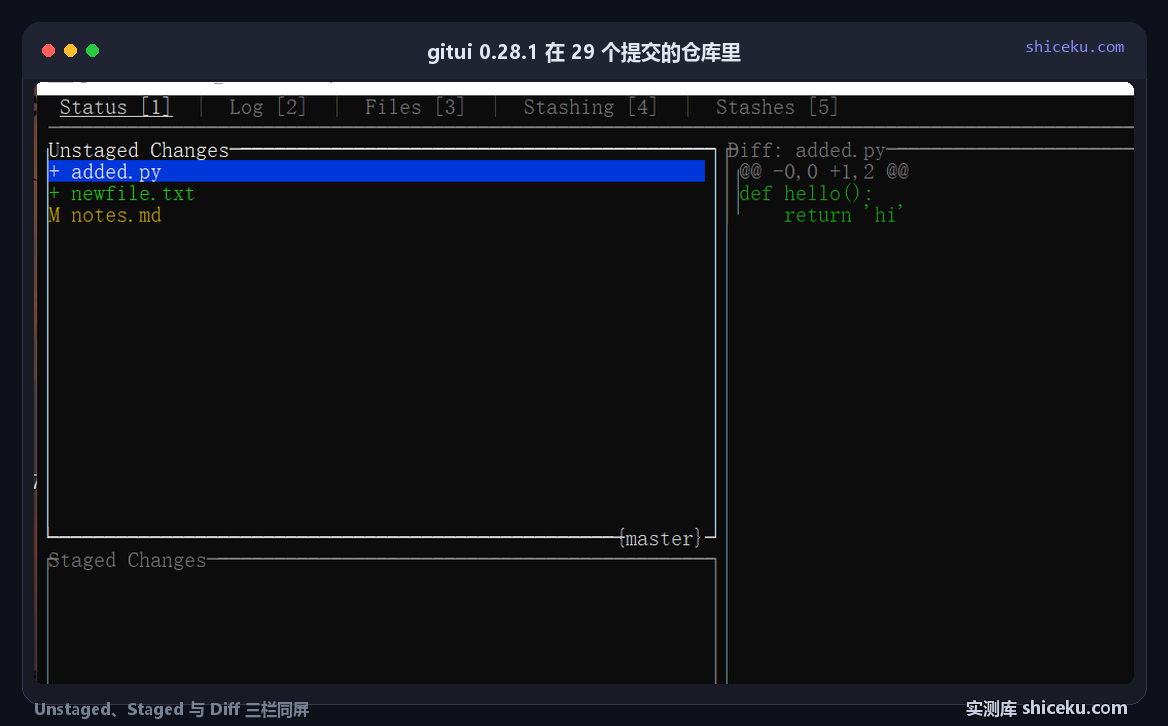
| Element | Observed | Meaning |
|---|---|---|
| Pane title | Diff: added.py | Selected path |
| Hunk header | @@ -0,0 +1,2 @@ | Zero old lines, two new |
| Added lines | def hello(): and return 'hi' | Green, prefixed with plus |
| Status letters | M and question mark | Modified and untracked |
Untracked files get a full diff
Because the blob did not exist, the hunk header reads minus zero plus two. That is git's convention for a new file, and it is the fastest way to confirm a file was never committed.
The status letters sit in a narrow column
One character per row: M for modified, a question mark for untracked, A for added. Reading that column down tells you the shape of the change set before you open any diff.
Key hints instead of a manual
The bottom two rows list the actions available on the current selection: Stage all [a], Stage [s], Reset [d], Ignore [i], Branches [b], Push [p], Fetch [f], Pull [t], Undo Commit [ctrl+u], and a more… marker.
| Key | Action | Scope |
|---|---|---|
| a | Stage all | Every unstaged file |
| s | Stage | Selected file only |
| d | Reset | Discard the change |
| b | Branches | Switch or create |
| ctrl+u | Undo commit | Last commit only |
Destructive keys are single letters
Reset is d, one keystroke away from Stage all on a. There is no confirmation dialog mentioned in the hint row. On a repository with uncommitted work, that distance is short enough to matter.
The hint row changes with context
On the Branch tab the hints become checkout, rebase and merge. That is why the interface needs no documentation: the available verbs are printed where you need them.
Before you unpack it
Nothing is written outside the repository, and no config file is created on first run. What matters is the console, because five panes need width.
| Item | Observed here | Note |
|---|---|---|
| System | Windows 10 22H2 (19045.6466) | Official Windows build |
| Console | 120 by 36 cells | All three panes visible |
| Config written | None | Flags and key bindings only |
| License | MIT | Commercial use allowed |
Narrow terminals collapse the layout
Below roughly 100 columns the third pane is squeezed and the diff wraps. On 80 columns it is barely usable, which is the opposite of what a terminal tool usually costs.
Pass the directory with -d
gitui does not walk up from the current directory the way git does. Pointing it at a repository needs -d <path>, and starting it in a non-repository prints an error and exits.
Three things that cost time
A wrong directory looks like an empty repository
Started outside a repository, the interface either refuses to open or shows nothing to stage. The cause is the missing -d, not an empty working tree.
Reset has no undo
Discarding an unstaged change with d removes it from the working tree. There is no reflog entry for work that was never committed, so the change is gone.
Staging is not committing
Staged files move to the lower-left pane but stay uncommitted until a message is typed. Closing the terminal after staging leaves the index dirty with nothing recorded.
When it earns a place
Reviewing a change set before committing is the case it was built for. One screen, three panes, 788 ms to first frame, and the status letters read down the left column.
If your workflow is a single git commit -am a day, a 9923584-byte interface adds width requirements without removing any typing. The value appears when a change set spans several files and you need to check them one at a time.
| Item | Value |
|---|---|
| gitui.exe | 9923584 bytes |
| Release archive | 4757777 bytes |
| First frame | 788 ms |
| Initial output | 3163 bytes |
| Test repository | 29 commits, 3 branches |