fzf is a command-line fuzzy finder: it reads a list on standard input, shows an interactive picker, and prints whatever you select. The Windows binary is a single 6235136-byte executable with no installer and no runtime.
The problem it solves is "I know part of the name." Typing a full path into a shell means remembering where things live; fzf lets you type three characters of the middle and narrows 5228 candidates down to the ones that match.
I measured two things on this machine: the non-interactive filter path, which is what scripts use, and the interactive picker. Both ran against a 5228-line file listing produced from a 5000-file directory tree.
A single 6235136-byte executable
The release zip is 2544236 bytes and contains exactly one file. There is no lib directory, no config template, and no registry write on first run.
| Item | Value | Note |
|---|---|---|
| Release zip | 2544236 bytes | fzf-0.74.5-windows_amd64.zip |
| fzf.exe | 6235136 bytes | The only file in the archive |
| Files after unpack | 1 | No assets, no themes |
| Version command | 158 ms | Then 134 and 175 ms |
Version and build hash
# Three runs: 158 / 134 / 175 ms
fzf --version
0.74.5 (c0a193e0)
The second half of that line is the commit hash. It is the only reliable way to tell whether a downloaded binary matches a tag, since the file name does not carry the commit.
It is not a shell integration by itself
fzf only does the picking. The familiar Ctrl-R history search and Ctrl-T file insertion come from shell scripts that ship with the Unix packages, and this Windows zip has none of them. On Windows you either pipe a list into fzf yourself or use it with a wrapper. That part was not tested here.
Filtering 5228 paths
The test corpus was built with dir /s /b over a tree of 5000 files in 100 directories, giving 5228 lines. Feeding it through --filter runs fzf in batch mode: no interaction, just matching.
| Query | Hits | Wall time |
|---|---|---|
| mod_3 (fuzzy) | 1300 | 136 / 139 / 137 ms |
| README with -e (exact) | 800 | 144 / 135 / 135 ms |
| Input lines | 5228 | One line per path |
| Process start | 158 ms | Same order as the filter itself |
Most of the 136 ms is process start
A 158 ms cold start and a 136 ms filter run are the same magnitude, which means matching 5228 lines costs almost nothing and the executable launch dominates. On lists of this size the algorithm is not the bottleneck.
Fuzzy and exact are the same speed here
Fuzzy matching returned 1300 hits in 136 ms; exact matching returned 800 in 135 ms. With 5228 lines there is no measurable difference, so pick the mode by what you want to match, not by performance.
# Batch mode: filter a piped list, print matches, exit
dir /s /b tree | fzf --filter mod_3
# Exact substring instead of fuzzy
dir /s /b tree | fzf --filter README -e
What the picker actually shows
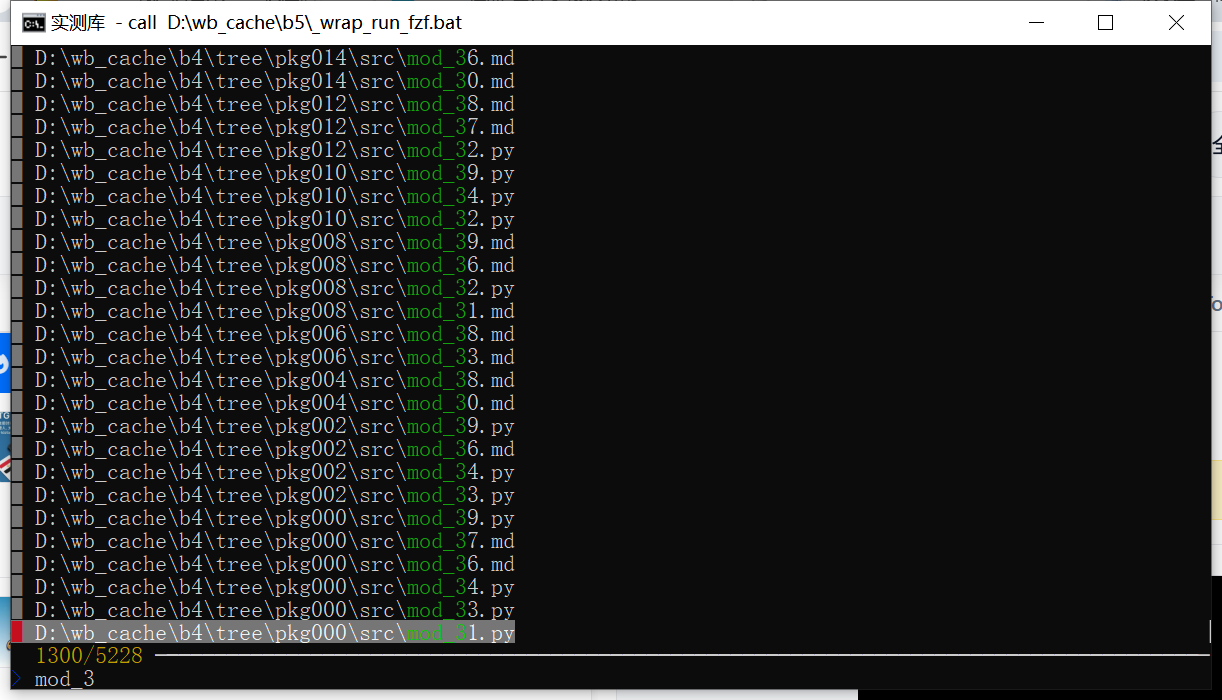
Run without --filter, fzf takes over the console: a prompt line at the bottom, a match counter, and the candidate list above it. The screenshot was taken with --query mod_3 so the state is reproducible without typing.
| Element | Observed | Meaning |
|---|---|---|
| Prompt line | > mod_3 | Characters you have typed |
| Counter | 1300/5228 | Matches over total candidates |
| List | Highlighted substrings | Which characters matched |
| Selection | Right-hand marker | Current row, moved with arrows |
The counter is the useful part
1300/5228 tells you how much the query narrowed things. If the first character drops the count from 5228 to 2600 and the third barely moves it, the query is not doing the work you think it is.
Highlighting shows why a row matched
fzf highlights each matched character, not the whole line. That is how you spot a bad match: three scattered characters across a path with nothing in common is a false positive even though the algorithm scored it.
Before you install it
There is nothing to configure and nothing to uninstall. What matters is the terminal, because the picker needs cursor control and a console without it will show garbage instead of a list.
| Item | Observed here | Note |
|---|---|---|
| System | Windows 10 22H2 (19045.6466) | Official windows_amd64 build |
| Console | cmd.exe with VT enabled | Picker renders correctly |
| Config files | None written | Flags only |
| License | MIT | Commercial use allowed |
Legacy consoles show escape codes
A console without virtual terminal processing prints the cursor-control sequences as literal text. Nothing is broken in fzf; the host cannot interpret the output. Enabling VT for the console fixed it in this test.
Pass the list in, do not expect it to find files
fzf never touches the filesystem. If the list is empty the picker shows nothing, which looks like a failure but is usually a broken pipe upstream. Verify with dir | find /c /v "" that the producer emits lines before blaming fzf.
Three things that cost time
Empty input looks like a hang
A producer that writes to standard error instead of standard output leaves fzf with 0 lines, and the window sits there with an empty list. Check the line count first.
Default mode is not exact matching
Typing mod_1 also matches mod_13 and any path where those characters appear in order. Add -e when a substring has to appear intact, or anchor with ^ and $.
Batch mode ignores the display
--filter returns all matches, not the one you would have picked. Used in a script it prints 1300 lines for the query above; add --select-1 or take the first line yourself if a script needs exactly one.
When it earns a place
Any workflow where a command needs a path argument is a candidate. Git checkout of a branch you half-remember, opening one log file out of thousands, picking a process to kill: the picker costs 136 ms and removes the guesswork.
If you already type full paths confidently, or your lists are under a hundred lines, this adds a step without removing one. The value shows up on 5000-line lists, which is exactly where a shell's tab completion gives up.
| Item | Value |
|---|---|
| fzf.exe | 6235136 bytes |
| Release zip | 2544236 bytes |
| Filter 5228 lines | 136 ms, 1300 hits |
| Exact filter | 135 ms, 800 hits |
| Cold start | 158 ms |