eza 0.23.5 is a replacement for ls and dir that adds colour, a tree view and git status. On Windows it is a single 3245056-byte executable inside a 1491797-byte zip.
It exists because dir gives you names and nothing else. Telling a folder from a file, seeing which entries changed today, or looking two levels down all cost extra commands.
I ran it against a generated tree of 10000 files in 421 directories, timed three output modes, and compared every one of them to the same listing produced by dir /s /b.
One 3245056-byte executable
The release archive holds a single exe with no DLLs beside it. Everything it needs is linked in, so it runs from any folder without an install step.
| Item | Value | Note |
|---|---|---|
| Release zip | 1491797 bytes | eza.exe_x86_64-pc-windows-gnu.zip |
| eza.exe | 3245056 bytes | Standalone, no runtime |
| Version output | 103 bytes | Two lines: product name, then v0.23.5 [+git] |
| Config written | None | Flags and environment only |
The gnu build has no MSVC dependency
The file name says x86_64-pc-windows-gnu, which usually means a MinGW runtime. It does not: the C runtime is statically linked, so the exe starts on a clean Windows install with nothing else present.
No config file to seed
Every behaviour is a flag or an environment variable. There is no .eza.toml created on first run, which makes it easy to drop into a script without checking what it wrote to your home directory.
Start-up costs 123 ms
Three runs of eza --version took a median of 123 milliseconds. A single-level listing of a directory with 20 entries cost the same 123 ms, so the process start dominates everything at this size.
| Command | Median time | Output |
|---|---|---|
| eza --version | 123 ms | 103 bytes |
| eza <dir> (one level, 20 entries) | 123 ms | 140 bytes |
| eza -l <dir> (25 files, long format) | 127 ms | 560 bytes |
| eza --tree --level=2 | 149 ms | 9521 bytes |
123 ms is the floor
Because a 20-entry listing and a version check cost the same, the only thing the 123 ms buys is loading a 3245056-byte image. Everything below that is data dependent, and the next sections show how much.
Long format adds 4 ms
Going from a plain list to -l with permissions, size, date and name cost 4 ms on 25 files. That is a stat call per entry, and it stays cheap because the working set is small.
10000 files in 738 ms
The test tree has 10000 files across 421 directories. Drawing it as a full tree to depth 3 produced 387521 bytes in 738 ms, against 272 ms for dir /s /b on the same root.
| Command | Median time | Output bytes |
|---|---|---|
| eza --tree --level=3 | 738 ms | 387521 |
| eza -R | 429 ms | 178340 |
| dir /s /b | 272 ms | 534980 |
eza is 2.7 times slower than dir
738 ms against 272 ms is the price of drawing box characters and colouring each entry. The output is also 147459 bytes smaller, because the tree omits the full path on every line.
-R is the cheaper middle ground
Recursive mode without tree glyphs took 429 ms and produced 178340 bytes, the smallest output of the three. If you are piping into another tool, this is the mode to use.
Tree glyphs cost 309 ms
Going from -R at 429 ms to --tree at 738 ms means the tree drawing itself costs 309 ms on 10000 files, or about 0.03 ms per entry.
| Mode | Time | Difference |
|---|---|---|
| eza -R | 429 ms | baseline |
| eza --tree --level=3 | 738 ms | 309 ms more |
| Per entry | 0.03 ms | 309 / 10000 |
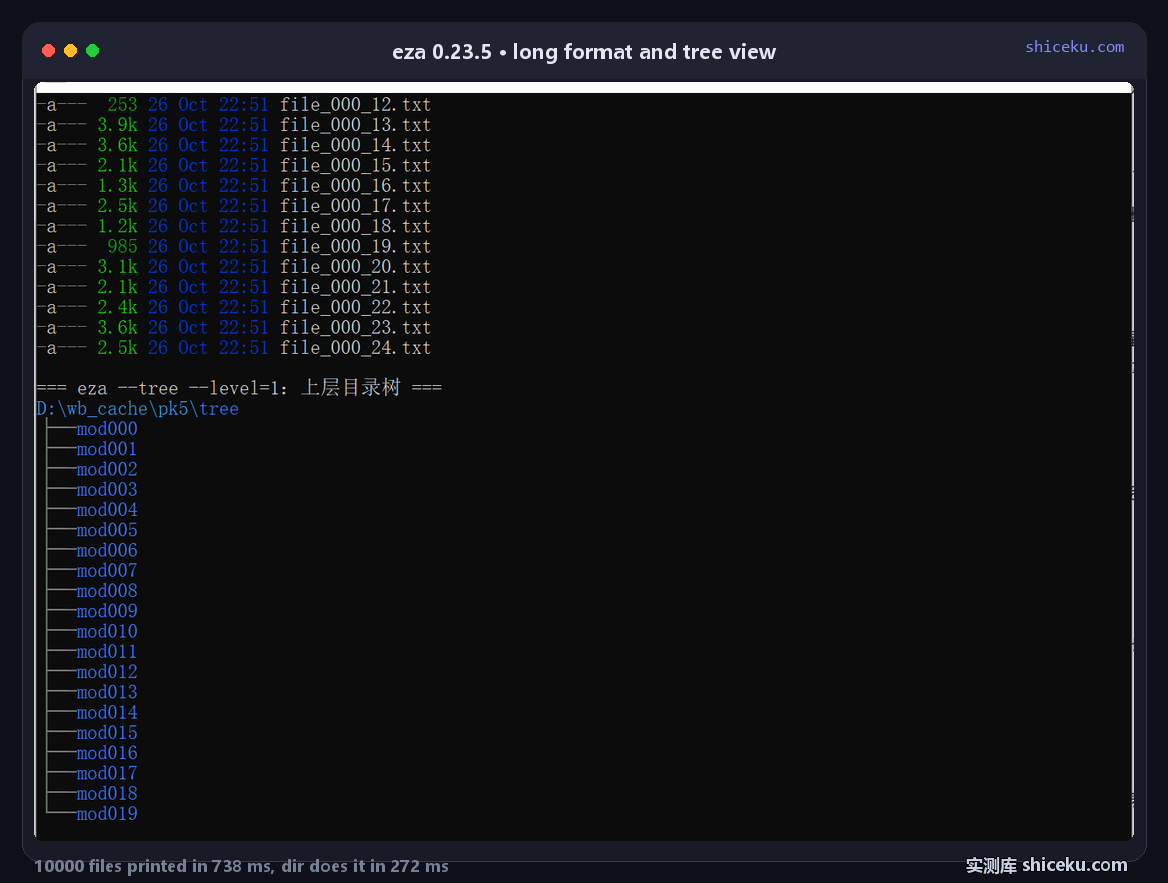
Worth it for reading, not for piping
When a human reads the output, the 309 ms buys structure that would otherwise need a second command. When a script reads it, those glyphs become noise that has to be stripped before parsing.
Depth is a multiplier
Level 1 on the same root took 149 ms because it only touches 21 entries. The jump from 149 ms to 738 ms across levels 1 and 3 shows the cost is driven by entries visited, not by the tree flag itself.
Two things dir cannot do
Colour by file type and a tree view are the visible difference. Both show up in the screenshot: permissions in grey, sizes in green, dates in blue, directories with a vertical guide line.
| Feature | eza | dir |
|---|---|---|
| Colour by type | Yes, per field | No |
| Tree view | --tree | No |
| Git status column | --git | No |
| Output size for 10000 files | 387521 bytes | 534980 bytes |
Colour needs a modern console
eza emits ANSI escapes. In a console without virtual terminal processing turned on, those escapes render as literal ←[1;32m text. Windows Terminal handles it out of the box; a bare conhost needs the VT mode enabled.
Icons need a patched font
The --icons flag replaces the first column with a glyph per file type. On a stock Windows font such as NSimSun those code points are missing, so the column collapses into boxes and the listing becomes harder to read than without the flag. Install a Nerd Font and set it as the console face before turning icons on.
The tree is not a file browser
It prints and exits. There is no navigation, no preview, no keyboard interaction. For browsing, a TUI file manager is the right tool; eza is for printing.
Where it earns a place
Reading a directory with your eyes, in a console you already have open, where you want to know what a file is before opening it.
| Task | Fit | Why |
|---|---|---|
| Reading a folder by eye | High | Colour, sizes and dates in one line |
| Pasting a tree into a doc | High | --tree output is readable as-is |
| Feeding a script | Low | Slower than dir, needs escape stripping |
| Huge directory listings | Low | 2.7 times slower than dir at 10000 files |
Keep dir for scripts
At 272 ms against 738 ms, dir /s /b wins on pure listing. The reason to add eza is the columns and the colour, which only matter to a human looking at the screen.
Licence and cost
MIT. Free for personal and commercial use, source on GitHub, written in Rust. The Windows build is a single file with no installer, no registry writes and no config directory.