Caddy is a web server that ships as a single 53159936-byte executable. Point it at a directory, give it ten lines of configuration, and it serves that directory over HTTP. The same binary is also a reverse proxy, and it will fetch and renew TLS certificates on its own.
The problem it removes is the ritual around small web tasks. Standing up nginx for a file share means editing a conf file, adding a site, reloading, then reading the error log when nothing appears. Caddy reads one file and starts.
Everything below comes from one session on Windows 10 22H2: unpack, validate, serve, hammer the endpoint, then look at what the process left on disk.
One binary, one config file
The release zip is 18479498 bytes and contains three files. There is no MSI, no registry write, and no runtime to install. Unpacking took 0.33 seconds.
| File | Bytes | Role |
|---|---|---|
| caddy.exe | 53159936 | The server and CLI |
| README.md | 1725 | Pointer to the docs site |
| LICENSE | 1099 | Apache 2.0 |
| Whole zip | 18479498 | 3 files after unpacking |
Apache 2.0 matters if you plan to bundle it. Redistribution inside a commercial product is allowed, and the notice file is the only obligation.
The version call costs 0.39 seconds
caddy version returned in 0.39 seconds and printed a single line with the tag and the build hash. That is the slowest of the three commands measured here, because Windows scans a fresh 53 MB executable on first run.
Validate the config before you start
caddy adapt translates the Caddyfile into the JSON that the server actually consumes. It runs without binding a port, which makes it the cheapest way to catch a typo.
caddy.exe adapt --config Caddyfile --pretty
# 10 lines of Caddyfile
# -> 492 bytes / 34 lines of JSON in 0.24 seconds
The Caddyfile used in this test sets two global options and one site block. Port 8082 replaces the default 80 so the test does not collide with anything already listening, and the admin endpoint is pinned to loopback.
| Directive | Value here | Why |
|---|---|---|
| admin | 127.0.0.1:2019 | Config API, kept off the network |
| http_port | 8082 | Avoids the privileged port |
| root * | the shared folder | Document root |
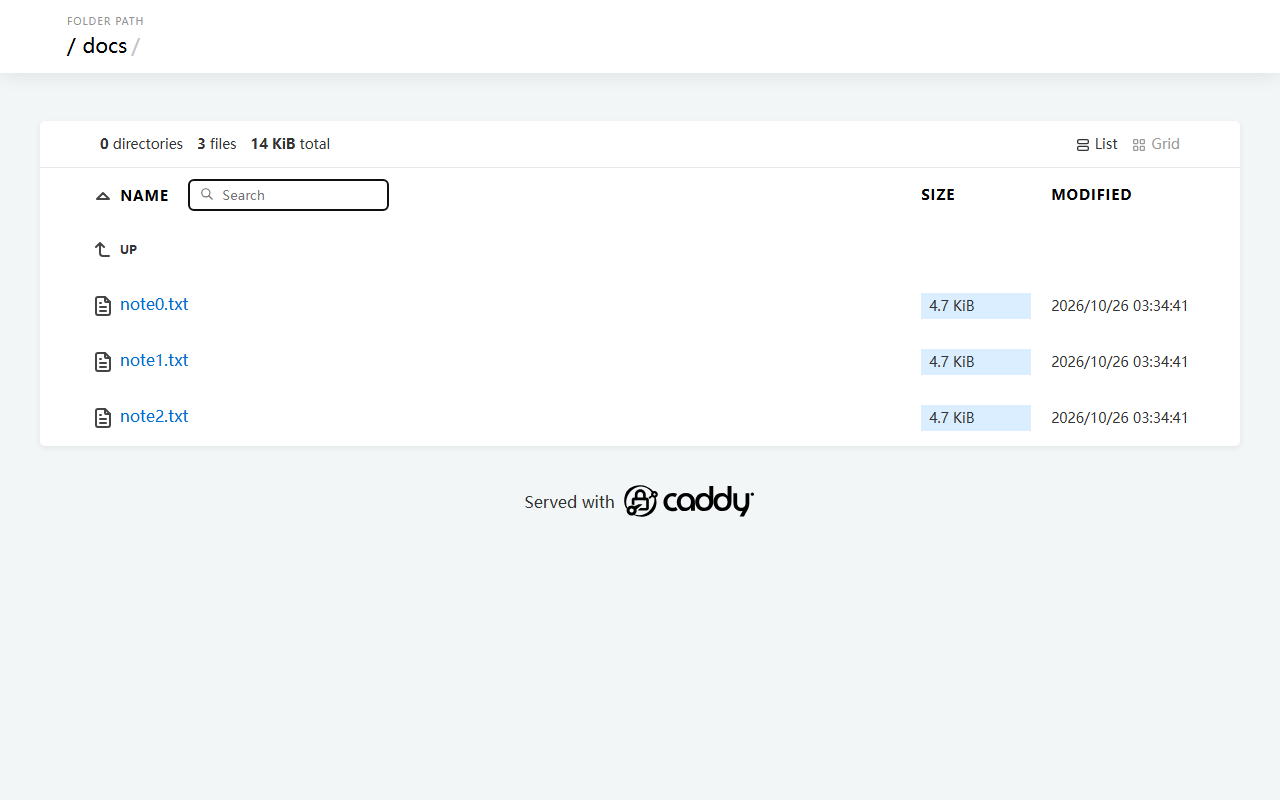
| file_server | browse | Directory listing on |
Start it and measure the endpoint
The service accepted connections 0.61 seconds after launch. The first directory listing painted in 0.05 seconds, and a 5 MB file came down in 0.01 seconds over loopback.
| Measurement | Result |
|---|---|
| Startup to first accepted request | 0.61 seconds |
| Directory page load | 0.05 seconds |
| Fastest of 50 requests | 0.8 ms |
| Median of 50 requests | 0.9 ms |
| Slowest of 50 requests | 12.4 ms |
| 5 MB file download | 0.01 seconds |
| Admin API round trip | 1.2 ms |
The slow outlier is the filesystem, not the server
Of fifty sequential requests, forty-nine landed between 0.8 and 1.1 milliseconds. The single 12.4 ms request is the cost of the directory read after Windows dropped the metadata cache.
That gap is worth knowing before you benchmark anything. A single slow sample says more about the disk than about the server, so report the median alongside the maximum.
The admin API answers in 1.2 ms
GET /config/ on port 2019 returns the running configuration as JSON. In this test it came back in 1.2 ms with two top-level keys, admin and apps. That endpoint is the reason the config can be changed without editing files by hand.
What it writes on first run
The program directory stays clean. Caddy puts its state under %APPDATA%\Caddy, and three files appear after the first successful start.
| File | Bytes | Content |
|---|---|---|
| autosave.json | 268 | Snapshot of the last active config |
| instance.uuid | 36 | Instance identifier |
| last_clean.json | 110 | Timestamp of the last certificate store cleanup |
%APPDATA%\Caddy\autosave.json     268 bytes
%APPDATA%\Caddy\instance.uuid      36 bytes
%APPDATA%\Caddy\last_clean.json   110 bytes
Backing up a working setup means copying that folder. Restoring it on another machine keeps the instance identity, which matters once certificates are issued against a domain.
Five things that bite
Port 80 is taken and the process just exits
There is no retry and no interactive prompt. The log prints a bind failure and the process ends. Set http_port and https_port in the global block before starting, which is what the 8082 in this test is for.
The directory returns 404 with the files right there
file_server without the browse argument serves index files only. Ask for a folder that has no index.html and you get 404 instead of a listing.
Editing the Caddyfile does nothing
The file is read once at startup. Reload through caddy reload --config Caddyfile or restart the process. The admin API can also push a new config directly.
A certificate request for localhost never resolves
Automatic HTTPS tries to validate against a public resolver. On a loopback-only host that validation cannot succeed, so the site stays on HTTP or the request fails after retries. Keep the internal CA for local testing.
The admin endpoint listens on every interface
The default value has no host part, which means all interfaces. On a machine with a public address that exposes config writing to anyone who can reach port 2019. Pin it to 127.0.0.1, as this test does.
When it is worth it
For a shared folder on a small network, the whole setup is one binary and ten lines. Startup at 0.61 seconds and a 0.9 ms median make it feel like nothing is in the path.
As a reverse proxy in front of a few services it also holds up, and certificate renewal is the part most people stop maintaining by hand.
It is not the right tool if you need modules that only exist for nginx, or if the team already runs an nginx configuration management setup. Porting working configs costs more than it saves.
| Figure | Value |
|---|---|
| Executable | 53159936 bytes |
| Zip | 18479498 bytes |
| Config translation | 0.24 seconds |
| Startup | 0.61 seconds |
| Median request | 0.9 ms |