broot 1.61.0 is a terminal file browser that shows you a directory tree and filters it as you type. The Windows build is a single 13978624-byte executable that needs no installer and no runtime.
The problem it solves is one that dir and Explorer both miss: you know part of a filename, or part of a directory name, and you want to see the tree around it. Typing a path from memory is slow. Clicking through a dozen folders is slower.
I ran it on a generated tree of 10000 files in 400 directories, measured the launch cost three times, and hit the one screen every first-time user hits before they see the tree at all.
One executable, 13978624 bytes
The release archive for all platforms is 67984014 bytes because it ships eight builds. The Windows one is a single file you can copy anywhere.
| Item | Value | Note |
|---|---|---|
| Full release zip | 67984014 bytes | Eight target platforms |
| Windows-only repack | 6486179 bytes | exe plus README |
| broot.exe | 13978624 bytes | x86_64-pc-windows-gnu |
| Version output | 13 bytes | The string "broot 1.61.0" |
The gnu build runs on Windows without a toolchain
The folder name says x86_64-pc-windows-gnu, which sounds like it needs MinGW installed. It does not: the C runtime is linked in, so the exe runs on a clean Windows 10 install with nothing else present.
No config is required to start
Drop the exe in a directory, run it with a path argument, and the tree appears. Configuration files are created under %APPDATA%\dystroy\broot\config only when you change a default, so the first run leaves the system untouched.
Launch costs 234 ms
Three runs of broot --version took 255, 234 and 231 milliseconds. The first was slower because the 13978624-byte image was not in the file cache yet.
| Run | Milliseconds |
|---|---|
| 1 | 255 |
| 2 | 234 |
| 3 | 231 |
| Median | 234 |
Cold start adds 21 ms, not seconds
The gap between first and third run is 24 ms. broot is a Rust binary with no interpreter to boot, so the process is ready before a Python script would have imported its first module.
The tree is indexed lazily
Only the visible levels are read, which is why pointing it at a tree of 10000 files in 400 directories still draws the first screen immediately. Subdirectories below the visible depth are not enumerated until you expand them.
The first screen is not the tree
On a fresh install, broot refuses to show the tree until it asks about a shell function. The prompt reads "Broot should be launched using a shell function" and waits for [Y/n].
| Screen | What it wants | How to skip |
|---|---|---|
| Shell function prompt | Y or n, writes a launcher file | Pass --set-install-state refused |
| Tree pane | Typing to filter, Enter to open | Nothing, this is the working view |
| Help panel | Question mark | Press ? again to close |
The prompt exists because cd needs a wrapper
broot cannot change the shell's working directory from inside its own process. The shell function is what translates "user picked this path" into a cd in the parent shell. Declining it costs you that one feature and nothing else; the tree, the search and the file operations all still work.
refused is a real state, not a flag
Passing --set-install-state refused once writes a marker under %APPDATA%\dystroy\broot\config\launcher. A later run without the flag prints a line about removing that marker and then shows the tree, which is how you undo the decision.
Tree, search box, status bar
The working screen has three parts. The tree occupies the left, the search input sits at the bottom, and a status line on the right shows the key hints for the current scope.
| Element | Content |
|---|---|
| Tree rows | Indented by depth, size and extension on the right |
| Bottom hint | "Hit enter to go up, ? for help, or a few letters to search" |
| Right status | h: n, g: i, y: b, one toggle per letter |
| Root line | The absolute path, shown as D:/wb_cache/pk5 |
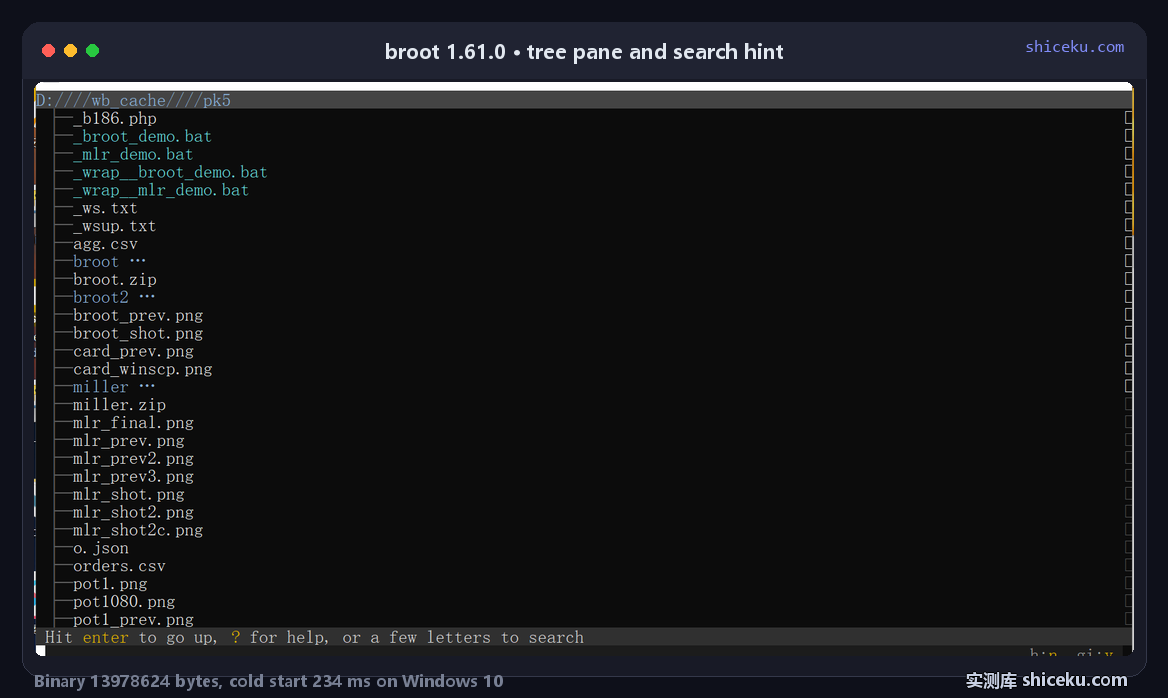
Typing filters instead of searching
There is no separate search mode. Any letter you type narrows the visible tree to paths containing it, in order. Typing three letters on a 10000-file tree is the whole interaction; there is no submit key and no separate results list.
The status bar lists only what applies now
The right side changes with context: h: n hides hidden files, g: i toggles git status, y: b cycles the preview panel. Each is a single keypress, and the bar stops listing a toggle once it is unavailable.
10000 files under one root
The test tree has 400 directories in two levels and 25 files in each, 37 MB in total. broot opens it without a progress indicator because it never walks the whole thing up front.
| Metric | Value |
|---|---|
| Files | 10000 |
| Directories | 400 |
| Total size | 37 MB |
| Visible levels on open | First level only |
| Launch cost | 234 ms |
Depth is expanded on demand
Only the first level under the root is read when the screen draws. Expanding a directory costs a directory read at that moment, so the cost of a 10000-file tree is spread across the session instead of paid at launch.
The size column is computed from metadata
File sizes appear next to each name, which means a stat call per visible row, not per file in the tree. That is why the column fills instantly and why scrolling deeper stays smooth.
What it does not do
Three limits showed up while measuring, and each rules out a use case.
| Limit | Consequence |
|---|---|
| No non-interactive mode | --cmd exits without running when stdout is a pipe |
| No scriptable output | Nothing to parse in a batch job |
| No built-in file copy | Hands the path to the shell instead |
Piped output kills the TUI
Running broot --cmd ":pt" with output redirected exits immediately and writes nothing. The tool is built around a terminal, so any automation has to use fd or find instead.
It hands work back to the shell
Copying, moving and deleting are not internal commands. broot either runs an external command on the selection or exits with a path for the shell function to act on, which is why the shell function matters in the first place.
Where it earns a place
Getting to a file whose name you half-remember, in a tree deep enough that clicking is tedious, is the case it was built for.
| Task | Fit | Why |
|---|---|---|
| Finding a file by partial name | High | Type three letters, tree filters live |
| Looking around an unfamiliar repo | High | Depth and size visible without opening files |
| Scripted file operations | None | No non-interactive mode |
| Bulk renaming | Low | One selection at a time |
Pair it with fd rather than replace it
fd answers "which paths match this pattern" and prints to stdout. broot answers "what does this part of the tree look like" and waits for a keypress. One is a filter, the other is a browser, and the 234 ms launch fits the second role.
Licence and cost
MIT. Free for personal and commercial use, source on GitHub, written in Rust. The Windows executable is a single file with no installer and no registry writes.